
Business travel itinerary templates bring transport, accommodation and meeting commitments into one working plan. These two editable Word downloads focus on a meeting day and a trip across several cities. They are designed for travelers, assistants and coordinators who need confirmed details, realistic transfer time and a clear handover. For a broader holiday or general trip planner, use the separate travel itinerary guide linked below. This page concentrates on the practical demands of work travel.
Compare the two downloads with your actual project in mind. The previews show the supplied layout or artwork, including the prompts and demonstration elements that explain how it is organized. Choose the option that best fits a business trip with appointments and travel connections, then edit a separate copy. The file descriptions below identify what is editable and what needs to be replaced before the result is ready to use.
Compare the two downloads
| Template | Download format |
|---|---|
| Business Meeting Day Itinerary | Editable Word DOCX |
| Multi City Business Travel Itinerary | Editable Word DOCX |
Choose the itinerary around the work
A meeting-day itinerary gives the traveler a local sequence of appointments and transfers. A multi-city itinerary puts the date and city first so the reader can follow the trip across locations. Choose the version that answers the traveler’s immediate question. Someone arriving for a single client meeting does not need a long tour-style schedule, while a coordinator arranging three cities needs a way to distinguish each day and booking. Keep the business purpose visible so optional activities do not crowd out the commitments that drive the trip.
Separate confirmed arrangements from intentions
A useful working itinerary distinguishes a booked flight from a possible connection and a confirmed appointment from a suggested time. Put tentative items in clearly labeled notes rather than presenting them as settled. Check names, dates and reservation details against the actual confirmations. The itinerary is an organized summary, not a replacement for a ticket or a hotel booking record. Keep supporting confirmations available through the traveler’s approved storage method, and revise the summary when the provider confirms a material change.
Plan transfers as part of the schedule
An itinerary becomes difficult to use when meetings appear to begin as soon as a flight lands. Include the time needed for arrival procedures, collecting belongings, reaching transport and traveling to the venue. The appropriate allowance depends on the route and local arrangements, so confirm it for the actual trip rather than applying one fixed buffer everywhere. Add the meeting contact and a way to notify them if the traveler is delayed. A short contingency note is often more useful than a tightly packed schedule with no recovery space.
Keep time zones and versions understandable
Use local dates and times with the city or time zone identified where confusion is possible. A flight can arrive on a different calendar day, and a remote meeting may be organized in the host’s time zone. Check the complete sequence instead of correcting one time in isolation. Give the itinerary a last-verified date and identify who maintains it. When a new version is shared, make sure the traveler knows which copy is current, especially if an assistant and a travel provider are both making arrangements.
Download the templates and view the previews
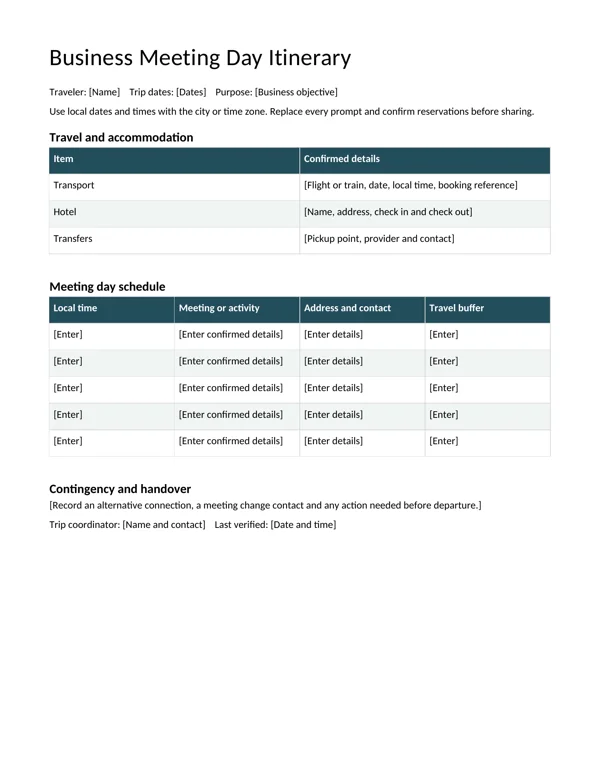
Business Meeting Day Itinerary
The preview shows the opening page. The download is an editable Word document; review every page after entering your own information. Keep an original copy of the download and save your project under a separate descriptive name.
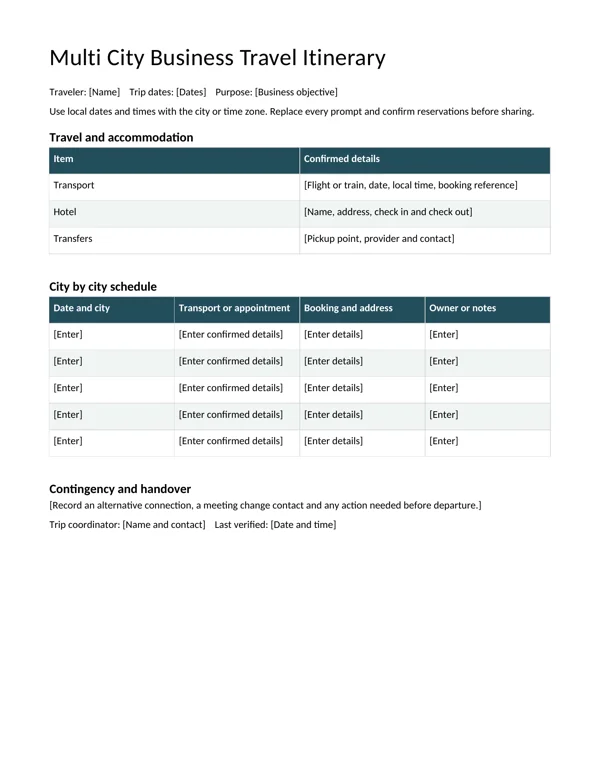
Multi City Business Travel Itinerary
The preview shows the opening page. The download is an editable Word document; review every page after entering your own information. Keep an original copy of the download and save your project under a separate descriptive name.
Details to check before using the template
- Traveler and purpose
-
Identify the traveler, trip dates and the business objective. Use the name that the travel records require, but do not add unrelated personal information to a document that may be shared widely. A short purpose helps the coordinator decide which commitments must remain fixed when a flight or meeting changes.
- Transport details
-
Record the provider, service number where applicable, departure and arrival places, local dates and confirmed times. Keep the booking reference in the appropriate controlled copy. Distinguish a pickup arrangement from the main flight or train service so the traveler can identify who to contact for each part of the journey.
- Accommodation
-
Give the hotel name, usable address and the relevant check-in and check-out dates. Add a contact when it helps with late arrival or changes. Verify that the accommodation covers every overnight stay, including the night after a late meeting and the night before an early departure if those are part of the plan.
- Meetings and appointments
-
Include the meeting title, local start time, venue and a useful contact. If an online connection is involved, store the access details through the approved channel and explain how to find them. Keep the itinerary readable without exposing passwords or unnecessary confidential meeting content in a broadly shared schedule.
- Transfer allowance
-
Show the realistic gap between commitments and note the transport method. A meeting address and a hotel address can look close on paper while requiring a longer journey in practice. Confirm the route for the actual location and include a fallback contact rather than treating every appointment as independently reachable.
- Coordination and handover
-
Name the trip coordinator and record when the details were last checked. Note the actions still needed before departure, such as confirming a pickup or sending a meeting agenda. If responsibility passes to another colleague, make the outstanding tasks explicit so a polished itinerary does not conceal unfinished arrangements.
A practical example
For a one-day client visit, the meeting-day version can show the arrival service, the transfer to the venue, the meeting and the return connection. A three-city assignment can use one row for each local date and movement, with separate booking and contact details. In both cases, the traveler should be able to identify the next commitment, the location and the person to contact if the plan changes.
How to prepare the finished version
- Save a separate working copy. Open the Word download and save a copy with a name that identifies the trip or client project. Keep the original template available for future work. Read the complete document before filling the first section so the schedule, responsibilities and supporting notes remain consistent. The prompts are there to guide editing and should not be left in a copy that someone will rely on.
- Enter the confirmed information. Work from the actual brief, booking confirmations or agreed scope. Replace the bracketed prompts and remove fields that do not apply. Distinguish confirmed details from items awaiting approval. If another person supplies information, record who should verify it rather than turning an uncertain detail into a definite statement simply because the document has a space for it.
- Check longer entries and page breaks. Use realistic names, addresses and descriptions while reviewing the layout. Long text can wrap differently from a short prompt, particularly inside a table. Add rows or adjust spacing when needed and keep related information together. Do not shrink the whole document to make one crowded section fit. Inspect every page after the final wording is in place.
- Review the document with its owner. Ask the person responsible for the trip or engagement to check the details that affect other people. Confirm the dates, responsibilities, contact route and any outstanding action. The template organizes information but cannot establish whether an arrangement is actually confirmed. Make the review meaningful by asking about the content and the next step, not only whether the document looks tidy.
- Keep the editable and shared versions aligned. Retain the Word file and generate a fixed-layout copy only when the sharing process calls for one. Open that output and inspect it before distribution. When a material detail changes, update the source first and make a new approved version. Use a clear revision name or date so a colleague can distinguish the current document from an earlier copy.
A final project review
Before sharing a business itinerary, ask a colleague to follow it as though they were the traveler. They should be able to identify the next appointment, the location, the transfer arrangement and the person to contact without searching through several messages. Check that a change to one connection has not left the hotel dates or the following meeting inconsistent. Keep a short list of unresolved arrangements outside the confirmed schedule, with a named owner for each action. When the trip is complete, retain only the information needed for the agreed business record rather than continuing to circulate a detailed travel document unnecessarily.
Why business trips need their own itinerary
A business trip has more moving parts than most holidays. Flights and trains must connect with meetings, meetings must allow for travel time across a city, and every booking reference, address and contact needs to be at hand when plans change. A business travel itinerary pulls all of that into one document so the traveler, their manager and anyone supporting the trip can see exactly where they need to be and when.
These business travel itinerary templates are editable Word documents built for two typical scenarios. The first is a meeting-day itinerary for short trips where one or two days are packed with appointments. The second is a multi-city itinerary for longer trips across several locations, with transfers, hotel changes and time zones. Both help you organize bookings, local times, transfers and contacts in a clear, printable format.
What a business travel itinerary includes
Traveler and trip summary
Traveler name, employee or department, trip purpose, dates, destinations and a short list of key meetings.
Transport bookings
Flight or train numbers, departure and arrival times in local time, terminals, seats and booking references.
Accommodation
Hotel name, address, phone, check-in and check-out times, confirmation number and distance to meeting venues.
Meeting schedule
Date, local start and end time, organization, contact person, address, meeting room and agenda notes.
Ground transfers
Taxi, ride-hailing, car hire or public transport, with pickup times and estimated journey durations.
Contacts
Host contacts, travel agent, company travel desk, local office and emergency numbers.
Documents and notes
Passport and visa reminders, presentation files, dress code, dietary needs and expense policy reminders.
Meeting-day vs multi-city itinerary
Meeting-day itinerary
Organized hour by hour. It works for one- or two-day trips with back-to-back meetings, showing travel buffers between appointments and a clear return journey. It fits on one or two pages and is easy to check on a phone.
Multi-city itinerary
Organized day by day and city by city, with a summary table at the top. It highlights hotel changes, inter-city flights or trains, and time zone shifts. It suits sales roadshows, conferences followed by client visits, and regional site inspections.
How to build a business itinerary step by step
- Confirm the purpose and meetings. List each meeting with confirmed times before booking transport.
- Book transport around fixed commitments. Leave buffer time for delays, security and city traffic.
- Choose accommodation near the main venues. Record the address and distance in the itinerary.
- Enter everything in local time. Label the time zone for each city to avoid confusion.
- Add transfers between every location. Include estimated travel time and the method.
- List contacts and references. Put booking numbers and phone numbers next to each item.
- Add documents and reminders. Note visas, chargers, presentation files and samples.
- Share and sync. Send the itinerary to the traveler, their manager and any assistant, and add key items to calendars.
- Update as plans change. Mark the version date at the top and resend after changes.
When to use these templates
Use a business travel itinerary for client visits, sales trips, trade shows and conferences, site inspections, training sessions in another office, recruitment events and executive travel managed by an assistant. Even a same-day trip to another city benefits from a short itinerary when there are several meetings and tight connections.
Tips for a practical itinerary
- Put the most important information, such as first departure and hotel, at the top.
- Keep each line short: time, activity, place, reference.
- Use 24-hour time or clearly mark AM and PM.
- Add map links or postcodes for every venue.
- Note check-out times so luggage plans are clear on departure days.
- Include a backup option for critical connections.
- Save a PDF copy offline in case of poor mobile signal.
Common mistakes to avoid
- Mixing time zones. Always list local times and label the zone.
- No travel buffers. Back-to-back meetings across town rarely run on time.
- Missing booking references. Hunting through email at a check-in desk wastes time.
- Outdated versions. Old copies cause missed changes; always date each version.
- Forgetting the return. Return transport and airport transfers are often left off.
Worked example: a three-city sales trip
A regional sales manager plans a four-day trip covering three cities. The multi-city template’s summary table shows each day, city and hotel. Day one begins with an early flight, arriving at 9:40 local time, followed by a taxi to the first client at 11:00, a lunch meeting and an afternoon visit to a distributor. Day two includes a mid-morning train to the second city, with the 2 hour 15 minute journey blocked out, and a product demonstration at 15:00. Day three is a trade show, and day four is a morning meeting before the flight home.
The manager’s assistant prepares the document, lists client contacts from the team’s contact list, and checks costs against the travel budget. The manager keeps receipts for every taxi and meal and records them on cash receipts where vendors do not provide one. For leisure days added to the end of the trip, he uses a separate personal travel itinerary.
Managing changes on the road
Business plans change: a meeting moves, a flight is delayed or a client adds a site visit. Keep the itinerary in a shared folder so updates reach everyone, and mark changes clearly, for example by highlighting new times. Tell hosts about delays as early as possible and note the new arrival time in the itinerary. A short end-of-day check, using a daily planner or the itinerary itself, helps you confirm the next day’s first departure and pickup.
Duty of care and safety
Many organizations have a responsibility to know where traveling employees are and to help them in an emergency. Sharing the itinerary with a manager or travel desk supports this. Include the nearest local office, emergency contacts, insurance details and any travel advisories for the destination. Travelers should also keep a copy of key documents separately from the originals.
Expense tracking alongside the itinerary
Linking expenses to itinerary items makes claims easier. Add a column for estimated cost and payment method beside each booking, and note which items are prepaid by the company. After the trip, compare actual spending with the estimate and attach receipts. This also helps finance teams plan budgets for similar trips in future.
Itineraries for teams and executives
When several colleagues travel together, create one master itinerary showing shared items and individual sections for different arrival times or meetings. For executives, assistants often add briefing notes for each meeting, such as attendee names, roles and objectives, so the traveler is prepared without searching through email. Keep sensitive notes in a separate document if the itinerary will be shared with hosts or drivers.
Preparing for international business trips
International travel adds extra steps that belong in the itinerary. Check passport validity and visa or entry requirements well before booking, and note any documents a host company must provide, such as an invitation letter. Record the local currency, power plug type and mobile roaming arrangements. Some countries have customs rules for product samples or equipment, so list items you are carrying and any paperwork they need.
Time differences affect more than meeting times. Plan the first day lightly if you arrive after a long flight, and avoid scheduling an important presentation immediately after an overnight journey. Add local public holidays to the itinerary, since offices and transport may operate differently. Finally, note the address of your country’s embassy or consulate and your company’s travel assistance number, and share the itinerary with someone at home as well as at work.
After the trip
Keep the final itinerary with your expense claim and meeting notes. It is a useful record of who you met and when, and it gives you a ready-made starting point the next time you visit the same cities or clients.
Business travel itinerary template FAQs
What should be included in a business travel itinerary?
Transport, accommodation, meetings, transfers, contacts, booking references, local times and key documents.
Should I list times in my home time zone or local time?
Use local time for each city and label the time zone. Add home time only if colleagues need it.
Can I share the itinerary with clients?
Share a version without personal details or internal notes, such as only meeting times and venues.
How far in advance should I prepare the itinerary?
Start once meetings are confirmed and update it right up to departure.
Can I use the template for conferences?
Yes. Add session times, booth duties and networking events to the meeting schedule.
Is Word the best format?
Word is easy to edit and print. Export to PDF for mobile viewing and offline access.
Conclusion
A clear business travel itinerary keeps meetings, bookings and transfers organized so travelers can focus on the purpose of the trip. Use the meeting-day template for short, busy visits and the multi-city template for longer trips across several locations. Download both Word templates above and explore more planning documents in the category archive.
Related resources
For related planning and supporting information, explore Travel Itinerary Templates and Daily Trip Example, Free Contact List Templates and Organization Guide, Free Daily Planner Templates and Scheduling Example. Choose the resource that matches the next step and keep the information consistent with your current project.
Frequently asked questions
How is this different from a general travel itinerary?
These downloads focus on business appointments, transfer allowances and coordination. The linked general travel itinerary guide covers a broader trip-planning use.
Can I edit the itineraries in Word?
Yes. Both downloads are DOCX files with editable text and tables. Add or remove rows to match the actual trip and review the page after changing the content.
Should every time be written in my home time zone?
Use clearly identified times that fit the trip and the participants. The templates encourage local dates and times with the city or time zone stated where needed. Check cross-zone meetings and overnight travel carefully.