
Event management website templates should show what you organize, how you work and what a potential client needs to send with an inquiry. These two downloads provide an event studio layout and a darker production-oriented version. Both use self-contained HTML and CSS with editable text, original illustrations and section navigation. They are presentation and inquiry starters, not event registration software or a ticket-selling platform.
Choose the layout around an event planning or event production business website. The two downloads use different visual arrangements, and the previews show the supplied artwork rather than a third-party design. Compare them with your actual content in mind: the amount of text, the images you can provide and the action you want the visitor or viewer to take. A suitable starting layout will need fewer compromises when you add the real information.
Compare the two template options
| Template | Files |
|---|---|
| Gather Event Studio | HTML and CSS source in ZIP |
| Summit Event Production | HTML and CSS source in ZIP |
Show the kinds of events you can deliver
Event management covers very different work, from private celebrations to business conferences. Choose the services your team can actually deliver and explain them with concrete examples. The studio layout offers a softer introduction to planning services, while the production version gives more emphasis to coordination and delivery. A broad list of every event category can make it harder for a client to see where you are strongest. Keep the opening focused, then use the service section to explain the practical scope.
Explain the process and the boundaries
A client needs to understand whether you provide full planning, partial coordination or support on the event day. Describe the stages, who approves decisions and how suppliers are selected. State whether venue sourcing, creative design, technical production and guest administration are included or discussed separately. The website does not need to contain a complete contract, but it should not imply that every service is part of one universal package. Clear boundaries make the first conversation more useful and reduce mismatched expectations.
Present experience without inventing evidence
Replace the sample illustrations with authorized photographs or keep them as a general visual theme. If you add past-event examples, describe your team’s actual role. Planning an event, supplying one element and attending as a photographer are different contributions. Use client names and testimonials only with appropriate permission. Avoid filling an empty section with invented statistics or logos simply to make the site look established. A concise account of your approach is more credible than claims that cannot be supported.
Design the inquiry route around useful details
The templates use a sample email link. Replace it and tell visitors what helps you assess an inquiry: event type, approximate date, location, guest count and the support they need. A budget range can be useful where the business uses it in planning, but explain its purpose. If you later add a form, connect it to a working destination and test notifications and confirmation. The static page alone does not schedule staff, register guests or reserve a venue.
Download both options and view the previews
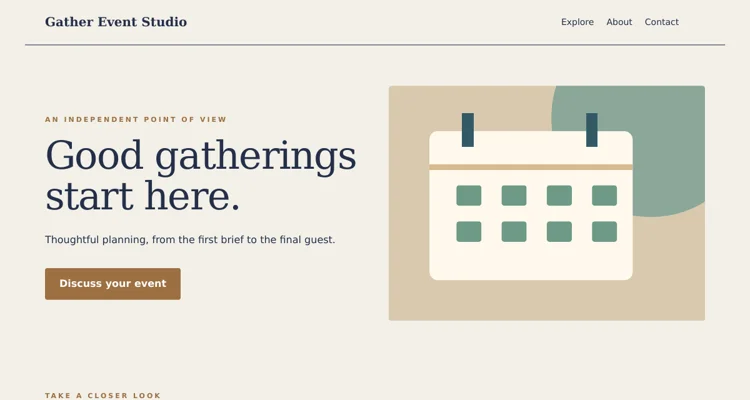
Gather Event Studio
The preview shows the desktop header and opening section. The ZIP contains the complete editable page and instructions. Save the download, keep an original copy and edit a separate version for your project. Review the finished wording and layout before use.
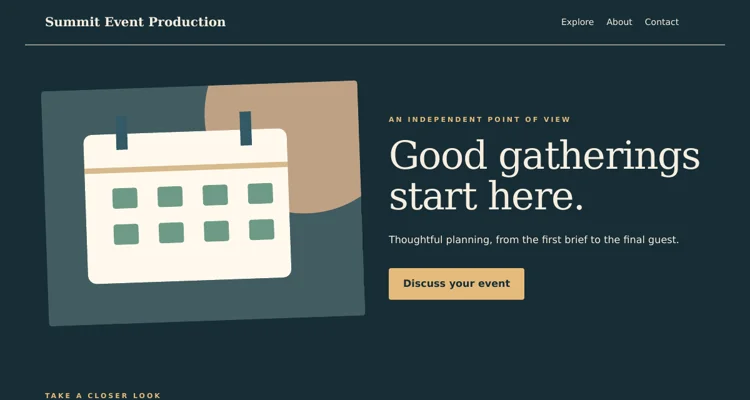
Summit Event Production
The preview shows the desktop header and opening section. The ZIP contains the complete editable page and instructions. Save the download, keep an original copy and edit a separate version for your project. Review the finished wording and layout before use.
Important details to customize
- Business identity
-
Use the actual business name and describe the planning or production work clearly. Keep the identity consistent across the header, page title and inquiry response. If your business serves a particular region, mention it where a prospective client can find it without searching through the footer.
- Service categories
-
Group services in a way clients understand. Private celebrations, business gatherings and production support may need different explanations. Describe what happens within each category and avoid using a service name that implies technical capabilities or staffing your team does not currently provide.
- Planning process
-
Outline the main stages from inquiry to delivery. Explain when you prepare a proposal, when the client reviews the plan and how decisions are recorded. The process should reflect your actual operation. If it changes for different event types, give a short explanation instead of presenting an inflexible sequence.
- Event examples
-
Choose examples that demonstrate relevant work and identify the contribution your team made. Add context about the brief, the scope and the result where you can substantiate it. Keep photographs and client references appropriate for public use, and remove details that the client did not agree to publish.
- Inquiry information
-
Ask for enough information to begin a useful conversation without making the first contact burdensome. A date window, location and approximate guest count may be more helpful than a long questionnaire. Tell the visitor whether the next step is a call, a brief or a preliminary quote.
- Working contact route
-
Replace the sample address and check who receives inquiries. Give a response expectation only if someone can maintain it. If a request is time-sensitive, explain the appropriate contact method. Keep the website and any downloadable brochure aligned so clients do not find conflicting service descriptions.
A practical example
A small planning studio may use the first layout to describe private celebrations and business gatherings, then invite visitors to send an event date, location and approximate guest count. A production team can use the second layout to explain supplier coordination and the run of show. In both cases, the site should make the team’s real responsibilities clear rather than suggesting that the template itself provides booking or guest-management software.
Editing and preparation checklist
- Extract and open the template. Download the ZIP and extract it into a folder before opening the HTML file. The page includes its CSS and vector illustrations, so the supplied layout does not depend on a theme installation or an external image service. Keep an untouched copy of the download and make your changes in a separate working folder. Read the included instructions before moving files to hosting.
- Replace the example content. Update the sample brand, headings, descriptive text, dates and contact address for the actual project. Work through the topic-specific fields above rather than changing only the main heading. Search the source for the example name and address so they do not remain in the footer or page metadata. Keep factual details consistent across every section and any linked information.
- Adapt the visual material. Use your own authorized photographs or retain the original illustrations where they suit the project. Keep image proportions intact and check the crop beside the text. Update alternative text when an image changes meaning. Use the CSS color settings consistently instead of adding unrelated colors to individual elements. A restrained visual system makes the page easier to maintain and gives visitors a clearer hierarchy.
- Test the navigation and contact route. Open every navigation link and confirm it reaches the intended section. Replace the sample email address and inspect the contact link. For the coupon layouts, open the expandable detail sections and check their labels and contents. These static files do not provide a backend, so any booking, ordering, RSVP or submission service must be connected and tested separately before you describe it as operational.
- Review different screen sizes. Inspect the page in a browser at a desktop width and a narrow phone width after making changes. Long names, large photographs and added navigation items can alter wrapping. Check that the main message and action remain visible, text does not run off the edge and links can be reached with a keyboard. Review the page with the real content, not only the original sample text.
- Publish and keep an update process. Use suitable hosting for static HTML, or have a developer adapt the source to your chosen system. Confirm that the live page loads and that all contact destinations still work. Keep the editable source and approved content together so future updates are straightforward. Review time-sensitive information regularly and remove sample statements before sharing the address with customers or guests.
What an event management website needs to do
An event website has a very practical job: convince visitors to attend and give them every detail they need to turn up on the right day, at the right place, with the right ticket. Whether you run conferences, workshops, festivals, weddings, corporate retreats or community fundraisers, your site should answer the basic questions within seconds: what is the event, when and where is it, who is it for, what does it cost, and how do I register?
These event management website templates provide two starting points in HTML, ready to customize with your own content. Because they are static HTML and CSS, they load quickly, work on ordinary web hosting and can be edited without a database. They are suited both to event planning businesses showcasing their services and to individual events that need a dedicated page.
Two kinds of event site
Event planner or agency site
Promotes a business that organizes events for clients. It typically includes services, a portfolio of past events, testimonials, a team section and a contact or quote request form.
Single-event site
Promotes one event, such as a conference or festival. It focuses on date, venue, schedule, speakers or performers, tickets, travel information and frequently asked questions.
Review the preview images in each download pack and decide which structure is closer to your goal. Many sections can be reused across both purposes with small changes.
Key sections to include
Hero area
Event name or business name, a short value statement, date and location, and a prominent registration or contact button.
About
Two or three paragraphs explaining the event’s purpose or the planner’s approach.
Schedule or agenda
Times, session titles, rooms and speakers. Keep it scannable with clear time labels.
Speakers, performers or team
Photos, names, roles and short bios.
Venue and travel
Address, map link, parking, public transport, accessibility details and nearby accommodation.
Tickets or registration
Prices, what each ticket includes, deadlines and a link to the booking system.
Sponsors or partners
Logos with links, grouped by level if relevant.
FAQs and contact
Answers to common questions plus an email address or form.
How to customize an event website template step by step
- Gather content first. Collect event details, images, speaker bios, sponsor logos and ticket information.
- Download and unzip the pack. Keep folders intact so CSS, images and scripts load correctly.
- Open index.html in a browser to preview the layout.
- Edit text in a code editor. Replace headings, dates, descriptions and button labels.
- Swap images. Use compressed images at appropriate sizes and add descriptive alt text.
- Update colors and fonts in the stylesheet to match your event branding.
- Link registration. Point buttons to your ticketing or booking platform, or add a simple form.
- Add a map and venue details. Embed a map or link to directions.
- Test responsiveness on phones, tablets and desktops.
- Publish to your web host and test every link and form on the live site.
When a static event template is the right choice
Static templates are ideal for one-off events, small and medium conferences, community events, workshops, and planning businesses that want a fast, low-maintenance site. If you need attendee logins, complex ticketing, seat selection or live schedule updates by many editors, combine the template with a third-party ticketing tool or move to a content management system.
Tips for event sites that convert
- Put the date, location and registration button above the fold, where visitors see them first.
- Use real photos from past events where possible.
- Show ticket deadlines and price changes clearly.
- Make the agenda easy to scan on mobile.
- Include accessibility information such as step-free access and quiet spaces.
- Add a countdown or “early bird ends” notice only if it is accurate.
- Keep the page fast by compressing images and avoiding heavy sliders.
Common mistakes to avoid
- Hiding the date or venue. Visitors should never have to search for basics.
- Broken registration links. Test them after every update.
- Outdated schedules. Mark last-updated dates and refresh after changes.
- Missing time zones for online or hybrid events.
- No contact option. People with special requirements need a way to ask questions.
Worked example: a regional small business workshop
A business support network plans a one-day workshop for local entrepreneurs. The organizer picks the single-event template, adds the workshop title, date and venue to the hero area, and links the main button to a free registration platform. The agenda lists six sessions with times and speakers, and the venue section notes parking, bus routes and step-free access.
Promotion includes printed posters adapted from grand opening flyer templates and a consistent email signature used by the organizing team. On the day, staff check in attendees using sign-in sheets and track session numbers with an attendance sheet. Afterward, participants receive a certificate of attendance, and the website is updated with photos and slides.
Accessibility for event websites
Event websites should be usable by everyone, including people using screen readers, keyboard navigation or zoom. Use real text rather than images of text for dates and schedules, provide alt text for speaker photos, make sure color contrast is sufficient, and label form fields clearly. Describe venue accessibility in detail: entrances, lifts, accessible toilets, seating and hearing loops. Clear information helps attendees plan and signals that your event is welcoming.
Search and sharing
Give each page a clear title with the event name, type and city, and write a short meta description. Use structured headings for the schedule and FAQs. Add social sharing images sized for major platforms so links look good when shared. Event structured data can help search engines understand dates and locations if you add it correctly. Submit the site to local event listings and partner websites for extra reach.
After the event
Do not let the site go stale. Add a thank-you message, highlights, photos and recordings, and a notice about future dates. Collect feedback with a short survey link. If you run the event yearly, keep the previous year’s content in an archive and update the main page with the next edition’s information as soon as it is confirmed.
Managing updates during the run-up
Events change constantly as the date approaches: speakers drop out, rooms move and sessions shift. Keep a single person responsible for website updates and a simple change log listing each edit and its date. Publish urgent changes at the top of the home page and send them by email to registered attendees. For multi-day events, consider a dedicated “What’s on today” section that is updated each morning.
Hybrid and online events
Many events now include an online audience, which changes what the website must explain. State clearly whether sessions will be streamed live, recorded or both, and which platform attendees will use. Show every session time with its time zone, and consider adding a converter link for international audiences. Explain how online attendees will receive their access link, when it will arrive, and what to do if it does not.
For hybrid events, separate in-person and online ticket types and describe what each includes, such as networking, workshops or catering. Add a short technical checklist for online attendees: a recent browser, a stable connection, headphones and a test link if available. After the event, publish recordings or slides in a dedicated section so both audiences can catch up.
Working with clients as an event planner
If you are a planner using the agency template, think of your website as a sales tool. Show a portfolio of past events organized by type, such as corporate, private and community, with short descriptions of the brief and your role. Include testimonials with permission, a clear list of services, and a simple enquiry form asking for event type, date, location, guest numbers and budget range. Fast, specific replies to enquiries often matter more than a long services page.
Event management website template FAQs
Can I use the templates for several events?
Yes. Duplicate the folder for each event or create separate pages for each one.
How do I add ticket sales?
Link to an external ticketing platform or embed its widget where permitted.
Do I need a database?
No. Static HTML works for most event sites; use a ticketing tool for registrations.
Can I add a countdown timer?
Yes, with a small JavaScript snippet. Make sure it reflects the correct time zone.
How do I show the schedule on mobile?
Use stacked time blocks rather than wide tables, and test on small screens.
What hosting do I need?
Any standard web host or static hosting service can serve the files.
Conclusion
A focused event management website helps attendees find details quickly and register with confidence. Choose the template structure that fits a planning business or single event, add clear schedules and venue information, connect registration, and keep content current. Download both HTML templates above and explore more event resources in the category archive. A clear, well-maintained site saves organizers time, reduces repeated questions and helps every attendee arrive prepared and on time.
Related resources
For the work around this template, you may also find Free Company Profile Templates and PDF Examples, Customer Information Sheet Templates and Examples, Free Sign-In Sheet Templates for Visitors and Events useful. Choose the resource that matches the next step and keep names, contact details and project information consistent between documents.
Frequently asked questions
Is registration software included?
No. These are static presentation pages. Guest registration, ticketing and staff scheduling require separate tools or development.
Can I add client event photographs?
Yes, where you have permission to publish them. Explain the role your business performed and use accurate captions.
Can I add an inquiry form?
Yes, but it needs a working submission destination and a process for handling the information. Test it before presenting it as operational.