
A New Year card is most effective when the design leaves room for a message that sounds like the sender. These two New Year card templates offer a midnight celebration design and a botanical greeting layout. Each includes editable SVG artwork and a PNG image. Add the recipient, write a short personal message and replace the sender placeholder before sharing or printing the card.
Choose the option that is closest to a personal greeting or a thoughtful business New Year message, then work through the editing guidance below. The previews show the supplied designs, including sample wording or field labels. They help you compare the layouts before downloading; the finished result will depend on the information and adjustments you add. Keep the original download as a starting copy and save your project under a separate name.
Compare the two downloads
| Download | Format | Starting point |
|---|---|---|
| Midnight Celebration Card | Editable SVG and print PNG | Option 1: compare the preview and adapt the layout to your purpose. |
| Botanical New Year Greeting | Editable SVG and print PNG | Option 2: compare the preview and adapt the layout to your purpose. |
Choose a tone that fits the recipient
The midnight design suits a celebratory greeting, while the botanical layout offers a quieter starting point. The artwork sets the mood, but the wording establishes the relationship. A family message can be affectionate and specific; a business message usually works better when it is warm, brief and appropriate for a broad audience. Avoid assuming that every recipient celebrates in the same way. A simple wish for the coming year can be thoughtful without becoming overly familiar or turning the card into a lengthy announcement.
Write a message before adjusting the type
Draft the greeting in plain text first. Identify the recipient, the main wish and the sender. Then fit the wording into the layout with comfortable spacing. If the message is too long, shorten it rather than reducing the font until it is difficult to read. Add a year only when you intend the card for that specific year, and inspect it again before reusing the file next season. The templates are designed so the message and sender can be updated without rebuilding the illustration.
Decide between a flat card and a folded card
The supplied artwork is a portrait front design. It can be printed as a flat card or used as the front panel of a folded card, but it does not include a prearranged inside and back panel. For a folded version, build the complete sheet at the required size and place the front artwork in the correct panel. Print a paper test and fold it before ordering heavier stock. For digital greetings, export the finished image and open it on a phone to confirm that the message remains readable.
What to include and check
- Greeting headline
-
Keep the headline short enough to read at a glance. A direct New Year greeting gives the design a clear purpose. If you add a specific year, make it part of the text review so the card is not accidentally reused with an old date.
- Recipient name
-
Personalize the recipient line when the card is meant for one person or household. For a general business greeting, use wording that still feels welcoming without pretending to be an individual message. Double-check spelling when preparing several personalized exports.
- Personal message
-
Write a message that matches the relationship and the amount of space. A sentence of thanks and a sincere wish usually fit well. Remove generic filler, avoid promises you cannot keep and leave enough breathing room around the text for a calm presentation.
- Sender name
-
Use the sender’s actual name, family name or business identity. Check whether a logo is necessary; a large logo can overwhelm a personal greeting. For a team message, make the sign-off clear about whether it comes from one person or the organization.
- Year or occasion
-
Specify the year only if it helps the greeting. An evergreen message can be reused after changing the personal wording, while a dated message needs a fresh export each season. Check the filename and the visible artwork so an older version is not distributed.
- Print and envelope size
-
Choose the finished card size before exporting. Confirm that the intended envelope fits a flat or folded card of that size. Keep text away from trim edges and test the front-panel placement when the artwork is used in a folded design.
A practical example
For a customer greeting, use a brief message such as: Thank you for being part of our year. We wish you a peaceful and rewarding year ahead. Follow it with the real sender or business name and avoid adding a sales offer unless the card is intended as a promotion. A personal card can mention a shared memory or a specific hope for the recipient. One sincere sentence often feels warmer than several lines of formal seasonal language.
Personalize a greeting without crowding the design
A recipient name and one specific sentence can make a card feel personal. You do not need to describe the whole year. Mention a shared experience, express appreciation or wish the person well in a way that suits the relationship. Keep the message within the comfortable text area, and do not place the sender so close to the edge that it disappears in a crop. For a business card, review the tone with the person whose name appears on it. The greeting should sound like something they would be comfortable sending.
Prepare a small print proof
Print the card at the intended size on ordinary paper before choosing the final stock. Check whether the headline feels too large, whether the personal message can be read comfortably and whether the sender is visible. For a folded card, mark the fold and assemble a test so the front is in the correct position. Keep important text away from the fold and trim edges. The source artwork can be resized, but the physical reading experience depends on the chosen card dimensions and the way the finished piece is handled.
Organize multiple greetings carefully
When creating cards for several recipients, keep an approved base design and make named copies. Check the recipient and sender together before exporting each one. Do not overwrite the generic source with a personalized final version unless you also keep an untouched original. If the greeting includes a year, use it consistently in the artwork and file name. For a team sending a general greeting, agree one message and one approved sender line so different versions do not circulate with conflicting wording or an outdated business identity.
How to customize and finish the file
- Start with the source file. Download the pack for your chosen new year card design and extract it. Keep the SVG and PNG together, but use the SVG when you need to change individual elements. Open a working copy in a vector editor that supports SVG. Confirm that the text, shapes and page size display correctly before making changes, rather than editing a screenshot of the preview.
- Replace the content first. Prepare the real information for a personal greeting or a thoughtful business New Year message before adjusting the decoration. Work through the fields described above and replace the sample wording. If a field does not apply, remove it and close the gap deliberately. Review the content as one message so an old date, example contact or unrelated heading does not remain in an otherwise updated design.
- Adjust spacing and visual balance. Use the longest real line of text to test the layout. Increase the text area or shorten the wording before making the font too small. Keep a clear difference between the headline and supporting information. If you move a decorative group, check that it does not cover essential content. Maintain proportions when resizing artwork so circles, illustrations and logos do not become stretched.
- Export for the actual destination. Choose the output dimensions for the place where the design will be used. Export a new PNG for ordinary image sharing, or follow the printer’s specified file requirements for a printed job. A source file and an export serve different purposes; retain both. Do not assume that a social platform, email client or print service will preserve your original crop and spacing automatically.
- Inspect the finished result. Open the exported file outside the editor and inspect it at normal viewing size. Check the headline, important details, contact information and edges. Ask someone unfamiliar with the project to explain what they think the design communicates. If their answer differs from the intended a personal greeting or a thoughtful business New Year message, revise the information hierarchy before distributing it. Save the approved version with a descriptive name so it is easy to identify later.
Download the two templates and view the previews
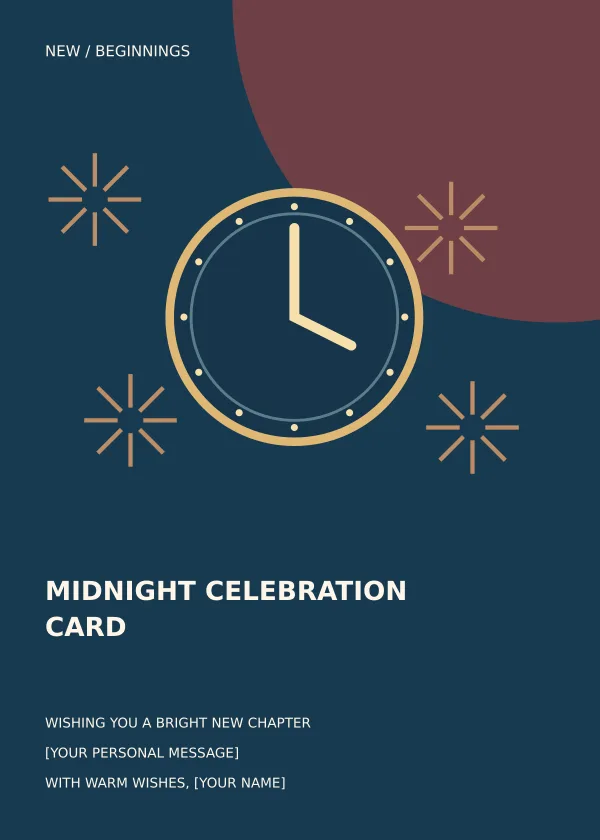
Midnight Celebration Card
Option 1 provides the midnight celebration card layout shown below. Download the Editable SVG and print PNG file, keep an untouched original and edit a copy for your own project. The preview is for comparing the supplied layout; use the download button to obtain the working file.
Botanical New Year Greeting
Option 2 provides the botanical new year greeting layout shown below. Download the Editable SVG and print PNG file, keep an untouched original and edit a copy for your own project. The preview is for comparing the supplied layout; use the download button to obtain the working file.

Related resources for the next step
Depending on your project, these related guides can support the work around this template: Free Contact List Templates and Organization Guide, Free Daily Planner Templates and Scheduling Example, Free Company Profile Templates and PDF Examples. Choose the resource that matches the task you need to complete, and keep information consistent when you use more than one document or design.
Frequently asked questions
Can I use these as folded cards?
Yes, as front artwork. The downloads are portrait front designs. Arrange an inside and back panel separately, then print and fold a paper test before making the final cards.
Can I change the year and message?
Yes. Edit the text in the SVG source and export a new image. The PNG is a flattened version and does not preserve separately editable text.
Can I send the card by email or messaging?
Yes. Export a finished image with the recipient message and sender completed. Preview it on a phone and check that the file size is reasonable for the channel you plan to use.