
Photography website templates should make it easy to understand your style, explore relevant work and ask about a session. These two downloadable layouts provide a light portfolio and a darker studio presentation. Both are self-contained HTML files with editable CSS and embedded vector illustrations. They are static website starters, with navigation and an email contact link; they do not include online booking, client galleries or a payment system.
Choose the layout around a photography portfolio and inquiry website. The two downloads use different visual arrangements, and the previews show the supplied artwork rather than a third-party design. Compare them with your actual content in mind: the amount of text, the images you can provide and the action you want the visitor or viewer to take. A suitable starting layout will need fewer compromises when you add the real information.
Compare the two template options
| Template | Files |
|---|---|
| Lightframe Portfolio | HTML and CSS source in ZIP |
| Noir Photography Studio | HTML and CSS source in ZIP |
Choose the portfolio around your clients
A photographer who mainly books portraits needs a different introduction from one who sells editorial assignments. Start with the people you want to reach and the work they need to see. The light version offers a calm, open presentation, while the dark version reverses the hero arrangement and gives the studio a stronger visual frame. Neither layout requires you to list every photographic specialty. Keep the services that represent your actual work and make the first collection a useful introduction to the type of assignment you want.
Replace illustrations with representative photographs
The supplied camera illustrations make the starting layout visible without using unlicensed photographs. Replace them with your own portfolio images when preparing a real site. Select work that reflects the style, subjects and editing a client can expect. A small, coherent collection is more useful than a large mixed gallery with no context. Give images descriptive alternative text when they communicate content, and crop each one deliberately. Do not rely on an automatic crop that removes a face or an important part of the composition.
Make the inquiry process clear
The contact section uses an example email address. Replace it with a monitored address and tell visitors what to include, such as the service, location and preferred date. If you use a separate booking platform, link to the actual booking page and explain what happens there. A static contact link does not reserve a date. Avoid describing the site as a complete booking system unless you have connected and tested that service. Keep package information consistent between the portfolio, inquiry response and any downloadable price guide.
Prepare a manageable portfolio update routine
Keep the editable source and the original image files organized. Update sample work when it no longer represents the assignments you accept. Review availability statements and contact details whenever your business changes. A portfolio does not need constant redesign to stay useful; clear service information, relevant images and a reliable next step matter more. If another person updates the site, give them a short checklist explaining image sizes, captions and which sections should be changed together.
Download both options and view the previews
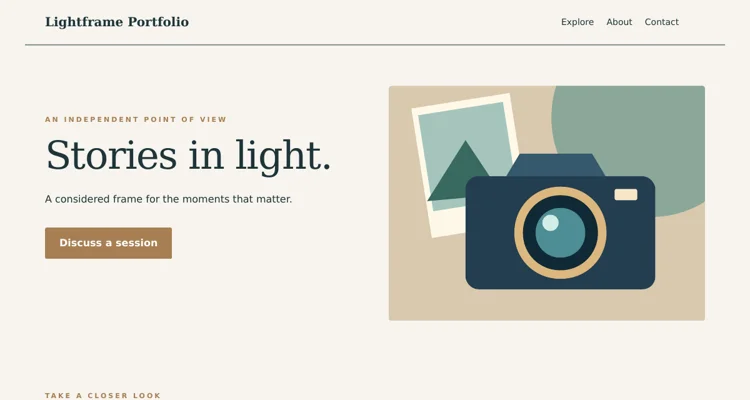
Lightframe Portfolio
The preview shows the desktop header and opening section. The ZIP contains the complete editable page and instructions. Save the download, keep an original copy and edit a separate version for your project. Review the finished wording and layout before use.
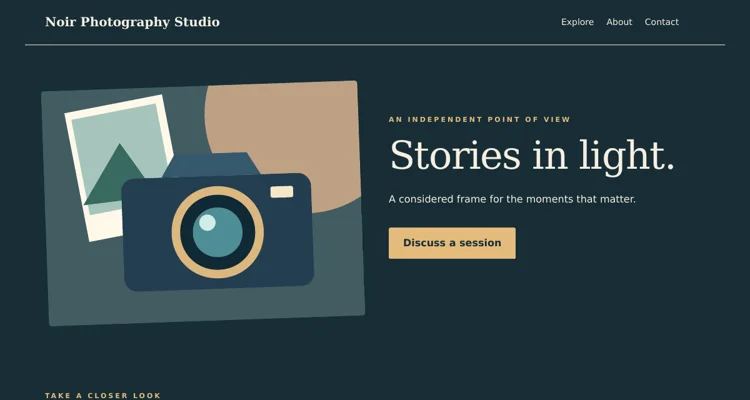
Noir Photography Studio
The preview shows the desktop header and opening section. The ZIP contains the complete editable page and instructions. Save the download, keep an original copy and edit a separate version for your project. Review the finished wording and layout before use.
Important details to customize
- Studio identity
-
Use the actual studio or photographer name and a short description of the work. A visitor should not need to infer the business from the pictures alone. Keep the same name in the page title, main heading, contact area and any linked portfolio accounts so the site feels coherent.
- Portfolio selection
-
Choose photographs that serve the intended client. Put the strongest relevant work first and avoid several near-identical images. Group work by a useful service or theme rather than a vague collection name. Add a little context where it helps the viewer understand the assignment or the kind of session shown.
- Service descriptions
-
Explain what each service involves in plain language. Portrait sessions, wedding coverage and editorial assignments have different expectations. Describe the practical scope without filling the page with equipment specifications. If a package is variable, direct the visitor to an inquiry rather than presenting a fixed promise that cannot apply to every booking.
- Location and travel
-
Identify the area you normally serve and how travel requests are handled. A visitor should know whether you work locally or accept assignments elsewhere. Keep the wording consistent with your actual availability. Do not imply that a location is included in a standard package if it requires separate planning and a revised quote.
- Image descriptions
-
Write alternative text for images that convey information and use captions where they add context. Avoid repeating the page keyword in every description. When an image is purely decorative, mark it accordingly. Review the page with images unavailable to see whether the service information and inquiry route still make sense.
- Contact and expectations
-
Replace the sample address and give visitors a clear next step. Explain which details help you answer an inquiry, and include an expected response window only if you can maintain it. Check that your email link opens with the correct address and that no old example contact remains in the footer.
A practical example
For a portrait photographer, the opening heading could identify the studio and the city, followed by a short statement about the session style. The first gallery can show a few representative portraits, with wedding or editorial work moved to a secondary section only if those services are offered. The contact prompt should ask for a preferred date and the type of session, rather than implying that clicking the link confirms a booking.
Editing and preparation checklist
- Extract and open the template. Download the ZIP and extract it into a folder before opening the HTML file. The page includes its CSS and vector illustrations, so the supplied layout does not depend on a theme installation or an external image service. Keep an untouched copy of the download and make your changes in a separate working folder. Read the included instructions before moving files to hosting.
- Replace the example content. Update the sample brand, headings, descriptive text, dates and contact address for the actual project. Work through the topic-specific fields above rather than changing only the main heading. Search the source for the example name and address so they do not remain in the footer or page metadata. Keep factual details consistent across every section and any linked information.
- Adapt the visual material. Use your own authorized photographs or retain the original illustrations where they suit the project. Keep image proportions intact and check the crop beside the text. Update alternative text when an image changes meaning. Use the CSS color settings consistently instead of adding unrelated colors to individual elements. A restrained visual system makes the page easier to maintain and gives visitors a clearer hierarchy.
- Test the navigation and contact route. Open every navigation link and confirm it reaches the intended section. Replace the sample email address and inspect the contact link. For the coupon layouts, open the expandable detail sections and check their labels and contents. These static files do not provide a backend, so any booking, ordering, RSVP or submission service must be connected and tested separately before you describe it as operational.
- Review different screen sizes. Inspect the page in a browser at a desktop width and a narrow phone width after making changes. Long names, large photographs and added navigation items can alter wrapping. Check that the main message and action remain visible, text does not run off the edge and links can be reached with a keyboard. Review the page with the real content, not only the original sample text.
- Publish and keep an update process. Use suitable hosting for static HTML, or have a developer adapt the source to your chosen system. Confirm that the live page loads and that all contact destinations still work. Keep the editable source and approved content together so future updates are straightforward. Review time-sensitive information regularly and remove sample statements before sharing the address with customers or guests.
A portfolio that lets the photos speak
For a photographer, the website is the portfolio, the shop window and often the first conversation with a client. Visitors decide within seconds whether your style fits what they want, so the site must put images first, load quickly despite large files, and make it simple to get in touch or book a session. These photography website templates in HTML and CSS give you a clean foundation to showcase your work without the cost or restrictions of a hosted portfolio platform.
Each download pack includes page files, a stylesheet and preview images. They suit wedding, portrait, family, newborn, event, product, food, real estate, landscape and street photographers, as well as photography students building their first portfolio and studios promoting mini sessions.
Pages and sections a photography site needs
Hero image
One strong photograph that represents your style, with your name or studio name and a short tagline.
Portfolio or galleries
Curated sets organized by genre or project, such as weddings, families, products or travel.
About
Your story, approach and a friendly portrait so clients feel they know who will be behind the camera.
Services and pricing
Session types, what is included, turnaround times and starting prices or a request-a-quote option.
Testimonials
Short quotes from past clients, with permission.
Booking and contact
A form asking for session type, date, location and budget, plus email and phone.
Blog or journal
Featured sessions, behind-the-scenes posts and advice, which help with search visibility.
How to customize a photography template step by step
- Curate first. Choose 15 to 30 of your strongest images per gallery rather than everything you have shot.
- Pick a layout. Compare the preview images and choose a template whose gallery style suits your work, whether full-width, grid or masonry.
- Unzip and preview the template, keeping folder paths intact.
- Resize and compress images. Export web versions, typically around 2000 pixels on the long edge, and compress them.
- Replace placeholders with your images and add descriptive alt text.
- Edit text for the hero, about, services and contact sections.
- Set colors and fonts. Neutral backgrounds usually let photos stand out.
- Connect the contact form to a form handling service or use a mailto link.
- Add your social links and a link to client galleries if you use a separate proofing service.
- Test on mobile and publish to your host.
When a static photography site makes sense
A static HTML site is a strong choice when you want full control over design, fast performance and low running costs, and when your portfolio changes every few weeks rather than hourly. It works well alongside a separate client gallery or proofing service. If you need online print sales, digital downloads with payments or many contributors editing content, you may later integrate e-commerce or migrate to a content management system.
Gallery layout options
Grid
Uniform thumbnails create a tidy overview, ideal for product and portrait work.
Masonry
Images keep their natural proportions in staggered columns, good for mixed portrait and landscape shots.
Full-width slideshow
One image at a time for immersive storytelling, suited to weddings and travel.
Project or story layout
A sequence of images with short captions, ideal for documentary or editorial work.
Tips for a photography website that books clients
- Show only the work you want to be hired for.
- Put the most striking images first in each gallery.
- Make pricing or starting prices visible to filter enquiries.
- Keep the contact form short and ask for the date early.
- Add location keywords naturally, such as the city or region you serve.
- Compress images to keep pages fast on mobile networks.
- Update galleries seasonally to show recent work.
Common mistakes to avoid
- Too many images. Large galleries dilute your strongest work.
- Huge uncompressed files that slow pages and frustrate visitors.
- Hidden contact details. Add a booking link in the navigation.
- No about section. Clients want to know who they will work with.
- Missing alt text, which hurts accessibility and image search visibility.
Worked example: a family photographer’s relaunch
A family photographer who had relied on social media decides to build her own site. She chooses the template whose layout puts large images first and selects 24 photos across three galleries: newborn, family outdoors and seasonal mini sessions. The services page lists three session types with what is included and starting prices, and the contact form asks for preferred dates, number of people and location.
To promote autumn mini sessions, she designs posters using photography flyer templates and offers holiday vouchers made from photography gift certificate templates. Finished client photos are delivered with an optional printed book based on photo album templates, which she previews for clients using an A4 mockup. Every email she sends now includes a branded email signature linking to the new site.
Protecting your images
Photographers often worry about image theft. Practical steps include uploading web-sized images rather than full resolution, adding subtle watermarks if they suit your style, embedding copyright information in image metadata and including a copyright notice in the footer. Disabling right-click offers limited protection and can annoy visitors, so focus instead on keeping originals safe and knowing how to request removal if your work is misused.
Search visibility for photographers
Many clients search with a location and a genre, such as “family photographer” plus a city. Use clear page titles and headings that describe your services and area, write short descriptions for each gallery, name image files descriptively and add meaningful alt text. A journal with featured sessions gives search engines fresh, specific content and gives potential clients a feel for real shoots.
Performance tips for image-heavy sites
Photography sites are naturally heavy, so performance matters. Serve appropriately sized images for each screen, use modern image formats where supported, and lazy-load images below the first screen. Avoid autoplaying background videos and large script libraries unless they add real value. Test page speed on a mobile connection and aim for galleries that feel smooth even on slower networks.
Getting consent and releases
If you feature identifiable people, especially children, make sure your contract or model release covers online portfolio use. Some clients are happy to be featured; others prefer privacy. Keep a record of permissions and remove images promptly if a client changes their mind. For commercial or editorial work, check whether your agreement with the client allows you to show the images publicly, and when.
Turning visitors into bookings
A beautiful portfolio is only half the job; the site must also guide visitors toward an enquiry. Add a clear call to action at the end of each gallery, such as “Check availability for your date”. Reply to enquiries quickly with a friendly message, a pricing guide and a link to book a call. Keep a simple record of where enquiries come from, so you know whether your website, social media or referrals bring the most clients, and adjust where you spend your time.
Writing an about page clients connect with
Clients are inviting you into important moments, so the about page carries real weight. Open with a friendly portrait of yourself, ideally in a natural setting rather than a formal headshot. Explain in a few sentences why you photograph what you do, how you work during a session and what clients can expect, for example a relaxed approach with plenty of time for children to settle. Mention practical details such as the areas you cover, whether you travel, and how long editing takes.
Avoid long lists of equipment; most clients care more about how you will make them feel than which camera you use. A short personal note, such as a love of early morning light or a background in teaching, can make you memorable. End the page with a clear invitation to get in touch, so the visitor’s next step is obvious.
Photography website template FAQs
Can I sell prints with these templates?
They are static HTML; link to a print lab, online shop or proofing platform for sales.
What image size should I upload?
Export web versions sized for large screens, commonly around 2000 pixels on the long edge, and compress them.
Should I show prices?
Showing starting prices helps filter enquiries, though some photographers prefer custom quotes.
Can I add client galleries?
Use a separate proofing service and link to it, or create password-protected pages through your host.
How many galleries should I have?
Three to five focused galleries usually work better than many small ones.
Do I need to know coding?
Basic HTML and CSS skills help; replacing images and text is straightforward.
Conclusion
A focused photography website showcases your best work, explains your services and makes booking easy. Choose the template layout that fits your style, curate your strongest images, optimize them for fast loading and keep your galleries up to date. Download both HTML and CSS templates above and discover more photography resources in the category archive. Revisit your galleries every season, retire older images and let the site grow with your style, so new visitors always see the work you are proudest of today.
Related resources
For the work around this template, you may also find Free Company Profile Templates and PDF Examples, Customer Information Sheet Templates and Examples, Pull Tab Flyer Templates and Printing Guide useful. Choose the resource that matches the next step and keep names, contact details and project information consistent between documents.
Frequently asked questions
Are these WordPress themes?
No. They are HTML and CSS source files. They can be adapted by a developer, but they are not installable WordPress themes.
Are portfolio photos included?
The templates include original vector illustrations. Replace them with your own photographs or images you have permission to use.
Can clients book and pay through the template?
No booking or payment backend is included. The supplied contact link is a starting inquiry route; connect and test any additional service separately.