
Registration form templates should collect the information needed to organize attendance without making the applicant complete unnecessary fields. These two editable Word forms cover event registration and course enrollment. Each uses a labeled table, an acknowledgement area and an optional marketing choice. Adapt the fields, instructions and organizer details to the actual event or course before distributing the form.
Choose the option that is closest to registering participants for an event or enrolling learners in a course, then work through the editing guidance below. The previews show the supplied designs, including sample wording or field labels. They help you compare the layouts before downloading; the finished result will depend on the information and adjustments you add. Keep the original download as a starting copy and save your project under a separate name.
Compare the two downloads
| Download | Format | Starting point |
|---|---|---|
| Event Registration Form | Word DOCX | Option 1: compare the preview and adapt the layout to your purpose. |
| Course Enrollment Form | Word DOCX | Option 2: compare the preview and adapt the layout to your purpose. |
Choose the form around the registration process
An event form usually needs to establish who is coming and which session they will attend. A course form may need to confirm the learner’s level, start date and preferred schedule. The two templates reflect these different purposes. Remove irrelevant rows instead of treating every available field as compulsory. Add clear instructions explaining how to return the form and whether submitting it confirms a place. If an organizer must approve the application, say that the registration remains subject to confirmation rather than implying immediate acceptance.
Use clear labels and proportionate data collection
Every field should have an understandable label and a practical reason to exist. Ask for one reliable contact method unless two are necessary. Keep optional requests visibly optional and provide enough space for a useful answer. An accessibility request should focus on the adjustment needed for participation rather than inviting a broad medical history. If the event involves children, design the guardian and permission process for that actual setting. The generic forms do not establish a complete safeguarding or consent procedure on their own.
Plan what happens after submission
A registration form is one step in a process. Decide who receives it, how the participant is told the outcome and how changes or cancellations are recorded. Keep payment references separate from sensitive card information. Do not ask people to write full card details on a general registration sheet. If a fee applies, provide the actual approved payment instructions separately. Explain how the collected information will be used and who to contact with questions. The marketing choice should remain separate from the information necessary to administer attendance.
Download the two templates and view the previews
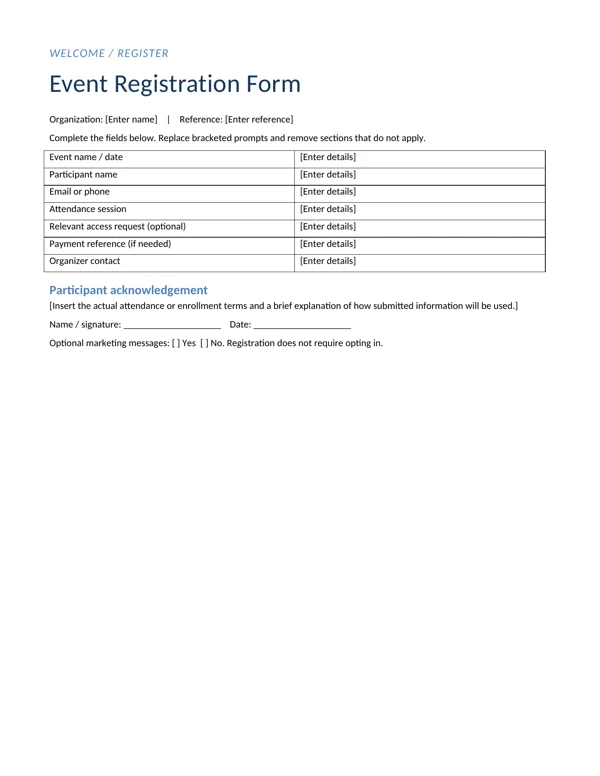
Event Registration Form
Option 1 provides the event registration form layout shown below. Download the Word DOCX file, keep an untouched original and edit a copy for your own project. The preview is for comparing the supplied layout; use the download button to obtain the working file.
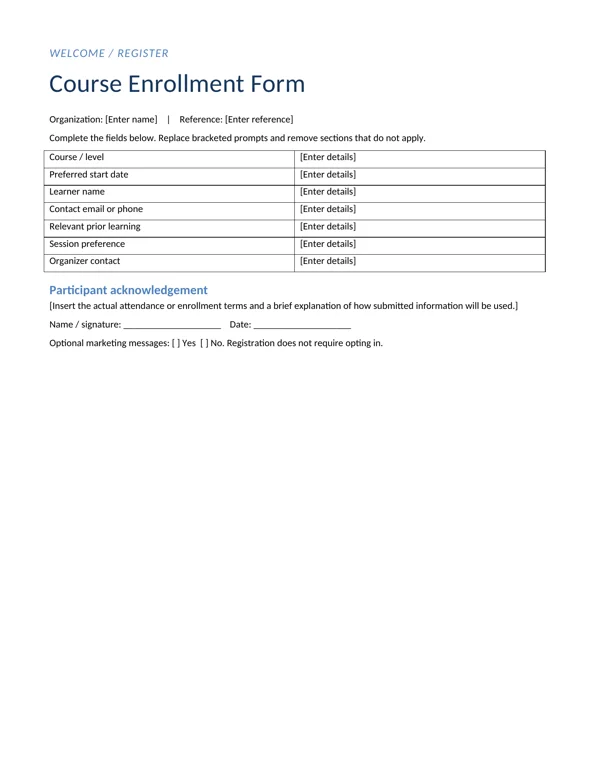
Course Enrollment Form
Option 2 provides the course enrollment form layout shown below. Download the Word DOCX file, keep an untouched original and edit a copy for your own project. The preview is for comparing the supplied layout; use the download button to obtain the working file.
What to include and check
- Event or course details
-
Name the event or course clearly and include its date, session or level where relevant. A form can become detached from an email or printed packet, so it should still identify what the person is registering for when viewed on its own.
- Participant contact details
-
Ask for the participant’s name and a reliable contact method. Explain the format if the organizer needs a particular identifier, but avoid adding personal details merely because older forms used them. Check that the space is adequate for longer names and contact addresses.
- Attendance option
-
Provide understandable attendance or session options. If only one option exists, prefill it rather than asking the applicant to repeat it. When places are limited, explain whether the selected option is a preference or a confirmed reservation.
- Relevant accessibility request
-
Keep the access request optional and focused on participation. Ask what arrangement would help rather than requesting an unnecessary diagnosis. Make sure someone responsible will review the request and contact the participant when clarification is needed.
- Payment reference if applicable
-
Collect a payment reference only when a fee and payment process apply. Do not place full card details or other sensitive payment credentials on the form. Give the organizer a way to reconcile a payment without collecting more financial information than the process requires.
- Consent and organizer contact
-
Write the acknowledgement and contact details for the actual organizer. Replace the sample notice with an accurate explanation of how the information is used. Keep optional marketing permission separate, and tell applicants how they will receive confirmation or request a correction.
A practical example
A one-day workshop may need the participant name, a contact address, a selected session and an optional access request. A multi-week course may also need a preferred start date and a brief indication of relevant prior learning. Neither automatically needs a national identity number, full date of birth or home address. Start with the decisions the organizer must make, then collect only the details needed to make those decisions and communicate the registration outcome.
Make completion straightforward
Read the form in the order a participant will complete it. Place the event or course details first, followed by the participant information and the relevant choices. Keep related fields together and avoid unexplained abbreviations. If someone will fill the form by hand, leave enough writing space. If it will be completed in Word, test a long name and a multi-line answer so the table does not become awkward. The person completing the form should not need to contact the organizer simply to understand what a field means.
Create a simple confirmation workflow
Decide what the organizer will do when a completed form arrives. Record the submission, check the relevant session and send a clear confirmation or request for missing information. Keep a distinction between an applicant, a confirmed participant and a person on a waiting list. If payment is required, reconcile it through the approved payment process. Do not rely on a completed form alone as proof that every requirement has been met. Explain the next step to the participant and give them a contact for changes.
Maintain an accurate attendance record
Once registration is confirmed, transfer only the necessary information into the attendance process. A public sign-in sheet should not expose all the details collected on the original form. Keep optional access requests and other private information with the people who need it to organize participation. When someone cancels or changes sessions, update the relevant records so the organizer does not reserve an unused place. After the event or course, follow the organization’s retention process rather than keeping copies indefinitely merely because they are easy to store.
How to customize and finish the file
- Save an editable working copy. Open the Word document and save a separate copy for your organization. Read the complete registration form template before entering information so you understand how the sections relate. Keep the original download available for future use. If your office uses another word processor, inspect the document carefully after opening it because table dimensions and line breaks can change between applications.
- Enter the real information. Replace the bracketed prompts and any example details with information approved for registering participants for an event or enrolling learners in a course. Remove fields that do not apply instead of leaving unexplained blanks. Use clear labels and consistent names throughout the document. When several people contribute, ask one person to review the combined wording so an older instruction or duplicate section does not remain in the final copy.
- Test longer entries. Try a long name, a multi-line address or another realistic entry that takes more room than the sample. Inspect the resulting line breaks and table rows. Increase the available space when necessary rather than reducing the type to an uncomfortable size. Keep related information together on the page and make sure a section heading is not separated from the text it introduces.
- Review the complete document. Read the file from the perspective of event organizers, training providers and small educational teams. Check what information is needed, what action follows and who handles questions. Confirm dates, contact details and organizational wording with the responsible person. The layout provides structure, but it cannot verify that the details you enter are correct or that the process behind the document is ready to use.
- Keep the source and approved output. Retain the editable Word version and create a fixed-layout copy only when your distribution process calls for one. Open the final output and inspect every page, including tables and any signature area. Give the file a descriptive version name. If the information changes later, update the source first and generate a new output so the editable and distributed versions remain consistent.
Why registration forms matter for events and courses
Every successful event or course starts with knowing who is coming. A registration form collects the details organizers need to plan seating, materials, catering, access needs, certificates and follow-up communication. It also gives participants a clear moment of commitment and a record of what they signed up for. These registration form templates provide two Word versions, one for events and one for courses, so you can preview both and adapt participant fields, instructions and confirmation text to suit your program.
They suit workshops, seminars, conferences, community events, fundraisers, training courses, evening classes, short professional programs and webinars with optional in-person sessions. Because they are in Word, you can print them for sign-up desks or convert them into fillable forms and PDFs.
Event registration vs course registration
Event registration form
Focused on a single date or short series. Typical fields include attendee name, organization, contact details, ticket type, session choices, dietary needs, accessibility requirements, how they heard about the event and consent for photos or communications.
Course registration form
Covers a course that runs over weeks or months. Typical fields include learner details, course name and start date, level or prerequisites, schedule preferences, payment method, emergency contact for in-person courses, learning support needs and agreement to course policies such as attendance and refunds.
Fields to include and why
Participant details
Full name as it should appear on badges or certificates, email, phone and, where needed, organization and job title.
Event or course selection
Session, workshop, course level or date, ideally with checkboxes.
Requirements and preferences
Dietary needs, accessibility requirements, language preferences or equipment needs.
Payment information
Fee, payment method, invoice details and discount codes. Avoid collecting full card details on paper forms.
Policies
Cancellation and refund terms, attendance expectations and code of conduct.
Consents
Photo and video permission, mailing list opt-in and data privacy acknowledgement.
Signature and date
Especially for courses with terms and conditions.
Office use
Registration number, payment received and confirmation sent.
How to set up the form step by step
- Define what you need to know. List decisions that depend on registration data, such as catering numbers or course groups.
- Choose the event or course template.
- Add your branding and event or course title, date and venue.
- Remove unnecessary fields to keep the form short.
- Write clear instructions at the top: deadline, how to submit and when confirmation will be sent.
- Add policies and consents in plain language.
- Test the form with a colleague to spot confusing questions.
- Publish or print the form and share the link or copies.
- Send confirmations with key details: date, time, location, what to bring and contact information.
- Record registrations in a spreadsheet and update numbers regularly.
When to use each template
Use the event template for one-off seminars, conferences, open days, fundraising dinners and community workshops. Use the course template for multi-week training, language classes, professional certification programs, hobby courses and school holiday programs. For organizations enrolling students into ongoing programs, an academy registration form may be more suitable, and businesses onboarding suppliers should use a vendor registration form instead.
Tips for higher completion rates
- Ask only what you will use.
- Group fields under headings and use checkboxes.
- State the registration deadline clearly.
- Explain why sensitive information is requested.
- Confirm registrations quickly, ideally automatically.
- Offer both online and printed versions where appropriate.
- Include a contact for questions.
Common mistakes to avoid
- Too many required fields, which reduces sign-ups.
- Unclear session choices that lead to double bookings.
- No accessibility question, leaving organizers unprepared.
- Missing confirmation details, causing people to arrive at the wrong time or place.
- Collecting card numbers on paper, which creates security risks.
- Ignoring data protection, such as keeping forms in unsecured folders.
Worked example: a weekend photography course
A community arts center runs a two-weekend beginner photography course. The coordinator uses the course template, keeping fields for name, email, phone, camera type, experience level, accessibility needs and emergency contact. A checkbox lets learners choose the morning or afternoon group, and the form explains the fee, payment deadline and refund policy. Photo consent is optional and clearly explained.
After registration closes, the coordinator transfers details to a spreadsheet adapted from a customer information sheet and prints sign-in sheets for each session. Tutors record attendance with an attendance sheet, and learners who complete the course receive a certificate of attendance. The form’s confirmation email reminds participants to bring a charged camera and memory card.
Paper vs online registration
Paper forms suit walk-in events, community settings and participants who prefer not to register online. Online forms reduce errors, provide instant data and allow automatic confirmations. Many organizers use both: an online form as the main route and printed copies at the venue for late sign-ups. Whichever you use, keep the same fields so data can be combined easily.
Data protection and privacy
Registration forms collect personal information, sometimes including health or accessibility details. Collect only what you need, explain how you will use it, store it securely and keep it only as long as necessary. Separate marketing consent from registration so participants can attend without joining a mailing list. Follow data protection rules where you operate, and delete or anonymize records after the event or course when they are no longer needed.
After registration closes
Use registration data to plan the event or course: confirm room size, order catering, prepare name badges, assign groups and arrange support for accessibility needs. Send a reminder a few days before the start date with key details. After the event, use contact details, with consent, to send feedback surveys and information about future programs.
Managing waiting lists and capacity
Popular events and courses fill quickly, so plan how you will handle demand. Set a clear capacity on the form and state what happens when it is reached, such as joining a waiting list. Record the order in which waiting-list registrations arrive and contact people promptly if places become available, giving them a short deadline to confirm. For courses, consider a second group or future date if the waiting list is long. Telling people where they stand reduces disappointment and repeated enquiries.
Designing forms that are easy to complete
Good layout speeds up completion and reduces errors. Use a single column for online forms, place labels above fields, and mark required fields clearly. On printed forms, leave enough space for handwriting and use boxes for dates and phone numbers. Put the most important fields, such as name and contact details, first, and optional questions near the end. A short progress note, such as “This form takes about three minutes”, helps people start.
Writing clear confirmation messages
The confirmation message is the second half of the registration form. It reassures participants that their place is secured and prevents last-minute questions. Include the event or course name, date and time with time zone, full venue address or online joining instructions, what to bring, arrival or login guidance, cancellation terms and a contact person. For paid registrations, attach or link the receipt.
Keep the confirmation short and scannable, with the most important details at the top. If information may change, say when final details will be sent. For courses, include the full schedule of sessions so learners can add them to their calendars. A clear confirmation also gives participants something to forward to managers or family members who need to know where they will be.
Registrations for group bookings
Schools, companies and community groups often register several people at once. Add a section to the event template for a group contact and a table listing each participant’s name, email and requirements. Clarify whether the group contact will receive all communications or whether each participant should be contacted individually. For invoicing, record the organization’s billing details and any purchase order number. Group bookings save time for everyone when the form is designed to handle them from the start.
Registration form template FAQs
What information should a registration form collect?
Participant details, event or course choice, requirements, payment information, policies, consents and a signature where needed.
Should registration forms be online or paper?
Both have advantages. Online is efficient; paper helps with walk-ins and offline participants.
How do I confirm registrations?
Send an email or letter with date, time, location, what to bring and contact details.
Can I convert the Word template into a fillable form?
Yes. Use form fields in Word or export to PDF and add fillable fields.
How long should I keep registration forms?
Only as long as needed for the event, course and any legal or financial requirements.
Can I use the same form for events and courses?
You can, but separate templates make each process clearer.
Conclusion
A well-designed registration form makes planning easier for organizers and signing up simpler for participants. Choose the event or course template, keep fields relevant, explain policies and consents, and confirm registrations promptly. Download both Word templates above and find more forms in the category archive. Review the form after each event so it keeps improving.
Related resources for the next step
Depending on your project, these related guides can support the work around this template: Academy Registration Form Templates and Field Guide, Free Sign-In Sheet Templates for Visitors and Events, Attendance Sheet Templates for Students and Employees. Choose the resource that matches the task you need to complete, and keep information consistent when you use more than one document or design.
Frequently asked questions
Are these online registration forms?
No. They are editable Word documents for printing or completing as documents. They do not send submissions to a database or provide an online registration backend.
Can I remove fields I do not need?
Yes. Delete irrelevant rows and keep only the information needed to administer the event or course. Review the instructions and acknowledgement after making changes.
Does submitting the form guarantee a place?
Only if the organizer’s actual process says so. State whether registration is confirmed immediately or requires approval, payment or a separate confirmation message.