
A service request form records the work or assistance a customer or staff member is asking for. The templates below include general and service-specific layouts. A clear request helps the receiving team understand the issue and decide what information is still needed.
View the templates and existing download links below.
Choosing the right format
Use an IT-specific form for technical support details and a general form for other services. Check what any organization-specific label means before adopting that sample. A request is not automatically an approval or a completed work order.
Details to include
- Requester, contact method and service location
- Description, affected equipment or service and requested timing
- Priority, approval and completion notes where needed
How to use the template
- Describe the issue in plain language and include relevant reference details.
- State the impact and requested response without guessing the cause.
- Send it through the provider’s accepted process and retain the request number.
Worked example
An IT request could state ‘office printer will not print; error code shown; two users affected’. Do not include account passwords or unnecessary sensitive data.
Download and printing notes
Check the destination and file format of each existing download before using it. Some samples link to an external resource; its availability and terms are controlled by that provider.
What a service request form does
A service request form is the written starting point for any piece of work someone asks you to do: fixing a leaking tap, servicing an air conditioner, setting up a laptop, repairing a printer or cleaning an office after a move. It captures who needs the service, what the problem is, where and when the work should happen and who approved it. Without a form, requests arrive by phone, text, email and hallway conversation, and details get lost.
A consistent form helps both sides. Customers or employees explain the problem once, technicians arrive with the right tools and parts, and managers can see how many requests come in, how quickly they are completed and what they cost.
Where service request forms are used
- Facilities and maintenance teams handling building repairs.
- IT help desks logging hardware, software and access requests.
- Property managers and landlords receiving tenant repair requests.
- Field service businesses such as HVAC, plumbing, electrical and appliance repair.
- Equipment rental and leasing companies scheduling servicing.
- Schools, hospitals and hotels coordinating internal work orders.
Completion guide: fields to fill in
Request details
- Request date and time
- Request or ticket number
- Requester’s name, department or unit, phone and email
Location
Building, floor, room or site address, plus access notes such as “key at reception” or “call on arrival”.
Service category
Plumbing, electrical, IT, cleaning, HVAC, furniture, security or other.
Description of the problem
What is happening, when it started, how often it occurs and what has already been tried. “Kitchen sink drains slowly since Monday; plunger used without success” is far more useful than “sink broken”.
Priority
Emergency, high, normal or low, with definitions so requesters choose consistently. For example, emergency could mean a safety risk or total loss of service.
Asset or equipment details
Make, model, serial number or asset tag, especially for IT and equipment requests.
Preferred date and time
When the area is accessible and the requester will be available.
Approval
Manager or budget holder signature where costs apply.
Technician section
Assigned technician, date attended, work performed, parts used, time spent, status and follow-up needed.
Sign-off
Requester confirmation that the work was completed satisfactorily.
Here You Can Get Service Request Form Templates Word
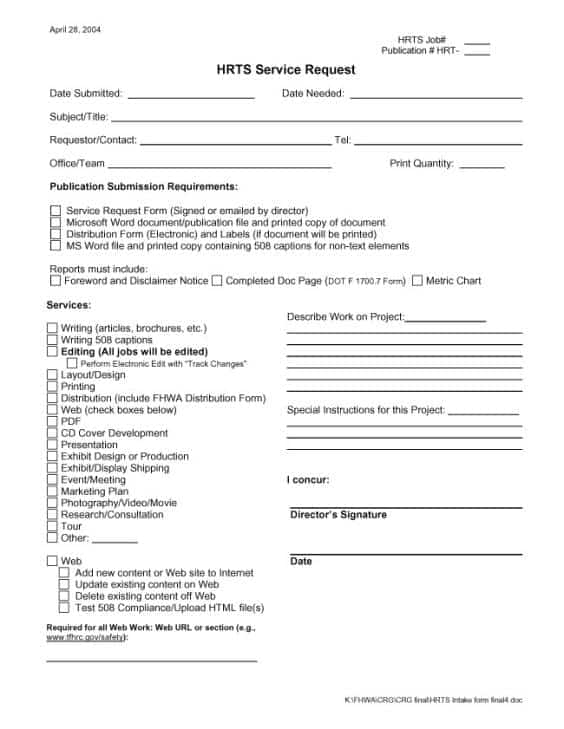
HTRS Service Request Form

How to complete the form well
- Fill in your contact details fully so the team can reach you.
- Choose the category that best matches the problem.
- Describe the issue in two or three specific sentences.
- Attach photos if the form allows, for example of a leak or error message.
- Select priority honestly; overusing “urgent” slows down true emergencies.
- Note access restrictions and safety concerns.
- Get approval if your organization requires it.
- Keep the request number for follow-up.
How to set up a service request process
- Choose a template and adapt categories and priorities to your organization.
- Decide how requests are submitted: paper, email or an online form.
- Number every request and log it in a register or spreadsheet.
- Set target response times for each priority level.
- Assign requests to technicians and track status: open, in progress, waiting for parts, completed.
- Close the request only after the requester confirms completion.
- Review the log monthly for recurring problems and costs.
Types of service request forms
Maintenance work order
Used by facilities teams for building and equipment repairs.
IT service request
Covers new equipment, software installation, account access and technical problems.
Tenant maintenance request
Used by landlords and property managers, with access permission and contact preferences.
Customer field service request
For businesses providing paid service visits, with pricing, warranty status and payment fields.
Internal facilities request
For room setups, moves, cleaning and events.
Tips for faster, better service
- Make the form short enough to complete in a few minutes, even on a phone.
- Define priority levels clearly on the form itself.
- Ask for photos; they often save a diagnostic visit and help the technician bring the right parts.
- Send an acknowledgment with the request number and expected response time.
- Record parts and time used so costs can be charged or budgeted accurately.
Common mistakes
- Vague descriptions such as “not working” or “fix ASAP”.
- No request number, making follow-up difficult.
- Closing requests without confirmation, which leads to repeated complaints.
- Ignoring patterns. The same fault reported every month may need replacement, not repair.
- Mixing emergencies with routine requests. Emergencies should also be phoned in immediately, with the written request completed afterwards so the job is still logged and tracked.
Worked example: an office air-conditioning fault
On a hot Tuesday, the office manager at a 30-person firm submits a service request: “Meeting Room B air conditioner blowing warm air since 9 am; thermostat set to 21°C; unit makes clicking sound.” She selects HVAC, priority high, adds the unit’s model and asset tag AC-B-02, and notes the room is free after 2 pm. Her director approves the call-out.
The facilities contractor acknowledges request SR-2026-0412 within an hour and sends a technician at 2:30 pm. The technician records a failed capacitor, replaces it, tests cooling and notes 45 minutes on site and one part used. The office manager signs off the next morning after confirming the room stays cool. The invoice references the request number, and the firm logs the cost with its other maintenance records alongside its vehicle inspection checklist forms and restroom cleaning checklists for shared areas.
Measuring service performance
A simple spreadsheet built from completed forms can show useful numbers: how many requests arrive each month, average time to first response, average time to completion and the most common categories. Share these figures with managers and contractors. If high-priority requests regularly miss their target times, adjust staffing or contract terms; if one building generates most plumbing calls, plan a survey of its pipework.
Preventive maintenance and service requests
Not every service request should come from a breakdown. Many organizations raise scheduled requests for preventive maintenance, such as servicing boilers before winter, cleaning air-conditioning filters every quarter or checking fire extinguishers annually. Using the same form for planned work keeps all equipment history in one place and makes it easy to see whether regular servicing is reducing emergency call-outs. Add a “planned” category and a field for the next due date so the following visit is never forgotten.
Service request form FAQs
What is the difference between a service request and a work order?
A service request is the initial ask from a customer or employee. A work order is the internal instruction issued to a technician to carry out the work. Many forms combine both.
Should requests be submitted on paper or online?
Online forms are easier to track, but paper forms remain useful where staff lack computer access. Use one numbering system for both.
How should priorities be defined?
Base them on safety and business impact. For example: emergency (safety risk or total outage), high (major disruption), normal (inconvenience), low (cosmetic).
Who should sign off a completed request?
The requester or a responsible person at the site, confirming the work was completed satisfactorily.
How long should service records be kept?
Follow your organization’s policy. Equipment history is valuable for warranties and replacement planning, so many keep records for several years.
Can tenants use this form?
Yes. Landlords can adapt it with access permission and preferred contact times, and keep it with the room rental agreement.
Conclusion
A service request form turns scattered requests into organized, trackable work. Collect specific details, set clear priorities, number every request and close it only after confirmation. Download a Word template above and adapt it to your team, and see related forms such as the customer information sheet in the templates category.
Related templates
For related tasks, see Customer Information Sheet Templates and Examples and Vendor Registration Form Templates for Supplier Intake.