
These status report templates help you explain where a project stands, what changed during the reporting period and what needs attention next. Download two original Excel files: a weekly project status report and an action-and-issue log. Each has sample entries, editable rows and a matching preview.
A useful report gives readers enough information to make a decision. It distinguishes completed work from planned work, highlights issues that affect delivery and identifies the person responsible for the next action. It should not be a long list of activities with no explanation of whether the project is still likely to meet its agreed goals.
Use the report for the main summary and the log for follow-up details. Replace the sample help-desk updates with facts from your own project. These worksheets do not calculate progress percentages, retrieve task data or assign a traffic-light status automatically; the team must maintain the information and agree what each status means.
Download the two worksheets | Read the completion guide | Frequently asked questions
Download the two editable templates
Each button downloads an original XLSX workbook directly. Open it in compatible spreadsheet software, save a fresh copy and replace the example entries. The preview shows the supplied layout; sample people, dates and amounts are illustrations. Check formulas after extending calculation ranges.
Weekly Project Status Report
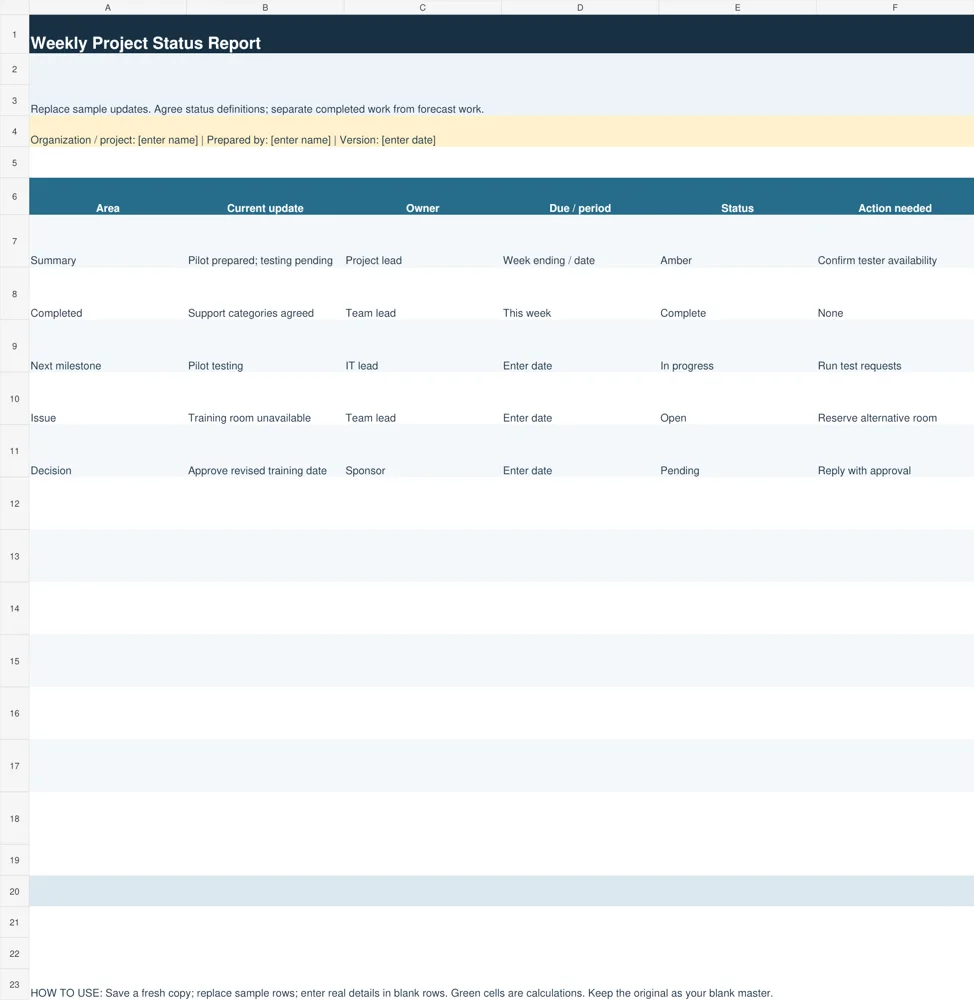
Use the weekly report to summarize completed work, next milestones, issues and decisions. Status labels are manually entered and need agreed definitions.
Download Weekly Project Status Report (XLSX)
Status Report Action and Issue Log
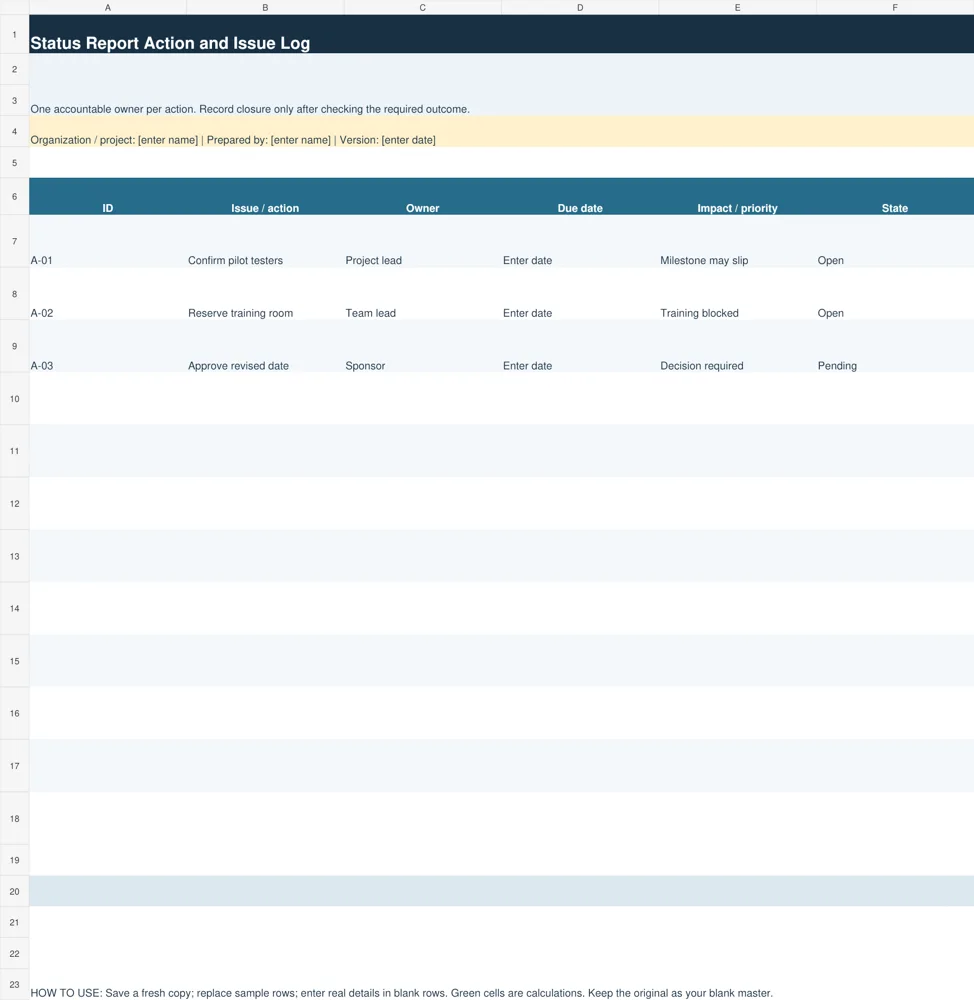
Use the action log to track individual follow-ups with accountable owners, due dates, impacts and states.
Download Status Report Action and Issue Log (XLSX)
What belongs in a project status report
Begin with the project name, reporting period, author and a short overall update. State the most important change since the previous report and whether a decision is needed. The opening should give a busy reader an accurate picture before they examine the detail. Avoid claiming that everything is on track when a significant unresolved issue threatens the next milestone.
List completed outputs rather than only hours worked or meetings held. Requirements agreed or pilot tests completed explain what advanced the project. Meeting with the team is useful context only when the report identifies what was agreed or resolved. Keep evidence available for a milestone marked complete.
Include upcoming milestones, current issues, future risks and decisions requested. An issue already exists, while a risk describes something that might occur. Keep the distinction clear because the response can differ. A current training-room cancellation needs an immediate alternative; a possible shortage of testers needs a preventive plan.
Assign an accountable owner and date to each requested action. If approval is needed, state what must be approved and the effect of delay. Readers should be able to respond without guessing which choice is being requested. Move detailed task history into the supporting log so the main report stays focused.
Choose the weekly report or the action log
The Weekly Project Status Report records the area, current update, owner, due date or period, status and action needed. Sample rows cover summary, completed work, next milestone, issue and decision. You can adapt those areas to your project while keeping the distinction between factual updates and requests for help.
The Status Report Action and Issue Log records an identifier, action or issue, owner, due date, impact or priority and state. A stable identifier such as A-01 makes it easier to refer to the same item across several reports. Keep the wording specific enough that another team member can understand what closing the item requires.
Use the two files together when several actions remain open between reporting periods. The main report can summarize the items that materially affect delivery, while the log preserves their follow-up history. The files do not synchronize automatically. Review both before sending an update so a closed action is not still described as pending elsewhere.
Schedule follow-up actions using daily planner templates.
How to prepare a weekly status update
Choose a reporting cutoff and gather updates from the people responsible for the work. Ask what was actually completed, what is expected next and what has changed. Record information for the same period so the report does not mix last week’s achievements with a forecast presented as current fact. Note when an update has not yet been confirmed.
Compare progress with the agreed milestones and scope. A large amount of activity does not necessarily mean the project is progressing as planned. If a required deliverable is late, explain the effect on the next stage. Do not replace an agreed date silently; identify the original commitment and the proposed change when the distinction matters.
Write a concise summary of the most consequential updates. Then describe the next milestone, its owner and any prerequisite that could prevent completion. If you use an overall status such as green, amber or red, explain the reason in words. Color alone can hide uncertainty and may be unclear to readers using assistive technology.
Review each request for action before distributing the report. A statement such as support needed is too vague. A clearer request is approve the revised training date by Thursday so invitations can be issued. Send the report to the people who need its information and keep a dated copy for the project record.
Worked example: reporting a help-desk pilot
In the example weekly report, the support categories have been agreed and the pilot has been prepared. Testing remains pending. The summary describes this as amber because tester availability has not yet been confirmed. That explanation is more useful than saying the team is busy or reporting a progress percentage with no defined basis.
The next milestone is pilot testing, owned by the IT lead. The action needed is to run test requests and record the results. A separate issue states that the training room is unavailable, with the team lead responsible for reserving an alternative. These are distinct items: one concerns testing capacity and the other concerns training arrangements.
The sponsor is asked to approve a revised training date. Record the actual deadline and the effect of a delayed answer. In the action log, assign separate identifiers to confirming testers, reserving the room and approving the date. Closing one action should not automatically close the other two.
At the next cutoff, report whether each action achieved its required outcome. A room booking is complete when the arrangement is confirmed under the team’s process, not merely when someone sends an enquiry. If testing remains blocked, update the impact and next step. Repeating the old wording without checking it can create a misleading impression of control.
Record a formal workplace decision with our memo templates.
Use status definitions and measures consistently
Agree how the team uses status labels before relying on them. For example, a team might use amber for a delivery risk that needs action and red for a problem requiring escalation, but the exact definitions should fit the organization. Apply the same definitions across reports and pair each label with a brief explanation.
If you include percent complete, define how it is measured. A count of completed tasks treats every task as equal, which can misrepresent work where one task is much larger than another. Avoid an unsupported percentage such as 90 percent complete when the remaining work includes a major untested deliverable. The provided worksheets intentionally do not calculate that measure.
For budget or schedule figures, compare the same basis and reporting cutoff. Distinguish actual costs from committed or forecast costs, and agreed milestones from proposed dates. Where information is missing, say what has not been confirmed. A blank field should not be interpreted as zero cost, no delay or no risk.
Select only measures that help the reader decide what to do. A useful indicator might show whether the next acceptance test is ready or whether an overdue decision is blocking work. Large numbers of metrics can obscure the problem when they are not connected to an action. Keep the most relevant facts visible in the main update.
Common reporting mistakes and follow-up
Avoid long activity diaries, unexplained status colors and actions assigned to the whole team. These make a report difficult to use. Give each action an owner, record its expected outcome and identify the date for follow-up. Where several people contribute, the accountable owner coordinates the response.
Keep completed items separate from pending ones and archive older reports with their dates. This lets readers see how a problem evolved and which decisions were made. Do not rewrite an old report to make it match the latest outcome. Maintain the current action log while preserving previous reporting snapshots.
Before sending, check names, dates, milestone references and any links to supporting documents. Confirm that the final requests still need action and that the intended recipient can make the decision. After the report is shared, use the action log to follow up rather than assuming publication of the report itself resolved the issue.
Clarify who is responsible for reporting through organizational chart templates.
Additional original previews and source references
The existing previews below are retained as reference examples. Source links open third-party pages or PDF references and may have their own access or licensing conditions. They are separate from the two original editable downloads above. An unavailable source is identified instead of being presented as a working download.
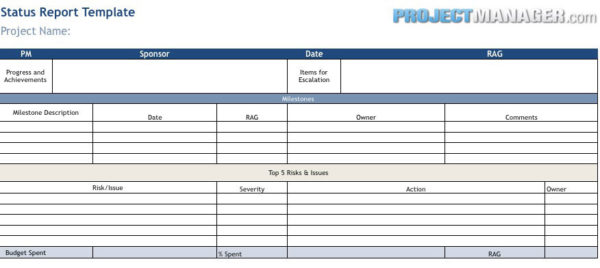
View original source 1 (external page). This is a source reference; inspect its format and access conditions there.
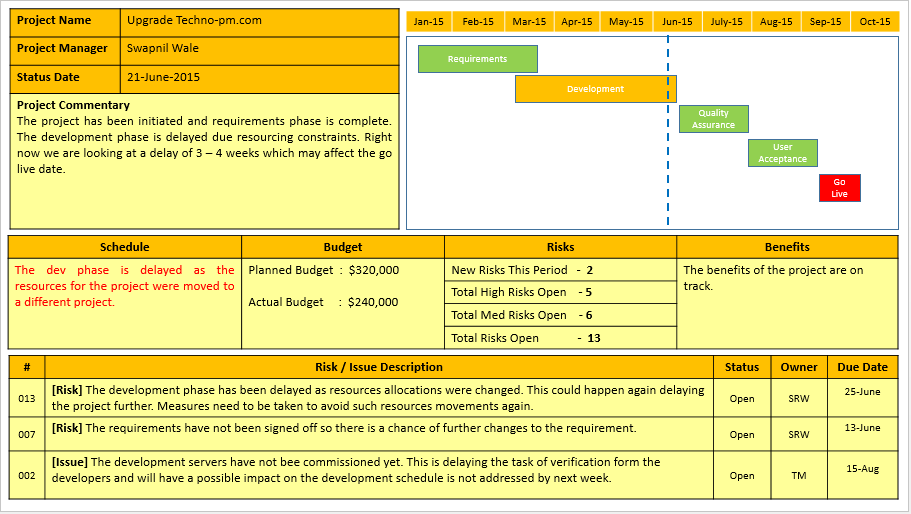
View original source 2 (external page). This is a source reference; inspect its format and access conditions there.
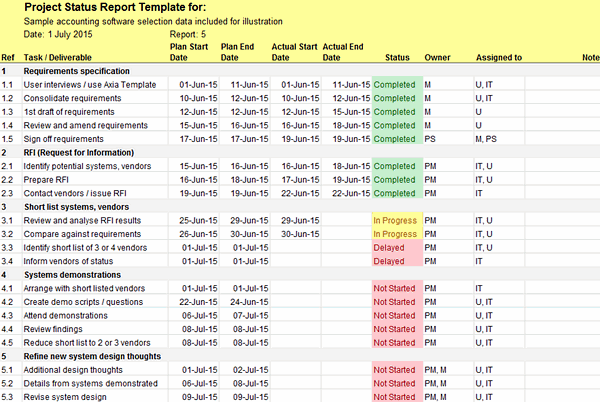
The original source for this preview could not be verified during the link check. Use the original editable downloads above for a direct file download.
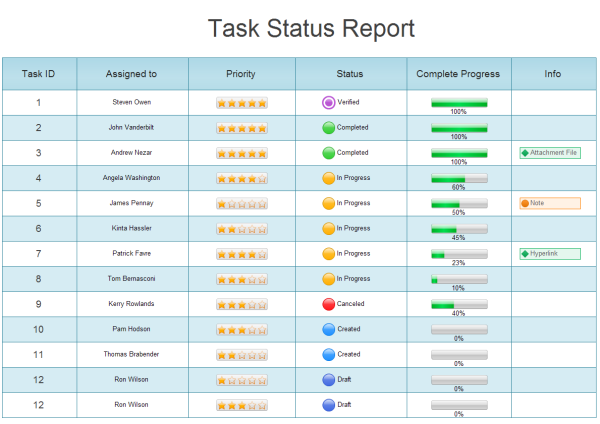
View original source 4 (external page). This is a source reference; inspect its format and access conditions there.
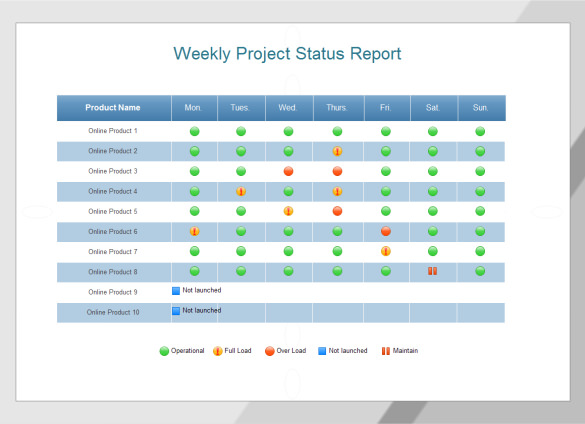
View original source 5 (external page). This is a source reference; inspect its format and access conditions there.
Frequently asked questions
What is the difference between the status report and action log?
The report summarizes progress, upcoming milestones and decisions for a reporting period. The action log tracks individual issues or actions with owners, due dates and states across periods.
Can I use the weekly template for monthly reporting?
Yes. Replace the reporting period and adjust the level of detail. Use a consistent cutoff and summarize the changes relevant to the month rather than copying every daily activity.
Are the traffic-light statuses automatic?
No. Status labels are entered manually. Agree definitions with your team and explain the reason for the selected status in the update.
Does the template calculate percent complete?
No. Progress percentages need a defined basis. The worksheets focus on completed outputs, next milestones and actions rather than generating a potentially misleading percentage.
When should an action be marked complete?
When the required outcome has been checked under your process. Sending a request or starting work does not necessarily mean the action is resolved.
You must be logged in to post a comment.