
These email signature templates give you two original HTML designs with live text and contact links: a Compact Professional signature and a Studio Contact signature. Each ZIP includes a standalone HTML file, an HTML snippet, a plain-text fallback and instructions. The previews are examples, not files to paste as one large image.
A useful email signature makes the sender easy to identify and gives the recipient a practical way to respond. Name, role, organization and one or two relevant contact routes are usually more useful than a crowded collection of slogans and social icons. Keep the information accurate for the account you are using.
The sample names, initials, email address, phone number and website must be replaced. The example.invalid links deliberately do not work, and the sample phone target is not your number. Edit both the visible text and the link destinations, then test the result in your actual email clients. Layout review here does not establish universal Gmail or Outlook compatibility.
Download both designs | Read the editing guide | Frequently asked questions
Download the two original template packages
Each button downloads an original ZIP package. Extract it before opening the files. The email signature packages contain editable HTML, a snippet, plain-text fallback and instructions. Replace visible text and link destinations, then test your email client.
Compact Professional Email Signature
Editable HTML signature with live text, contact links, inline styling and a plain-text fallback. Placeholder links must be replaced; client rendering needs testing.
Package contents: standalone HTML, an HTML snippet and a plain-text fallback, plus instructions. All placeholder wording must be replaced before use.

Download Compact Professional Email Signature (ZIP)
Studio Contact Email Signature
Editable HTML signature with live text, contact links, inline styling and a plain-text fallback. Placeholder links must be replaced; client rendering needs testing.
Package contents: standalone HTML, an HTML snippet and a plain-text fallback, plus instructions. All placeholder wording must be replaced before use.

Download Studio Contact Email Signature (ZIP)
Choose a compact professional or studio signature
The Compact Professional design uses a blue accent line and a simple single-column structure. It shows the name, role and company, email address, phone number and website. It is a useful starting point when you want a concise identity block without a logo, portrait or externally hosted image.
The Studio Contact version places an editable initials field beside the main text and uses a quieter green palette. It adds room for a studio name and a website or booking page. The initials are live text, not a photograph or a separate logo file, so they should be replaced with the appropriate letters or removed.
Both designs use HTML tables and inline styling. These choices keep the source straightforward, but email applications can still change pasted formatting or render it differently. Neither package installs a signature automatically or connects to an email account. Choose the layout, customize it and review a real test message before regular use.
What to include in a professional email signature
Put the sender’s name first, followed by the role and organization where relevant. Use the title you actually hold. The signature should help the reader understand who wrote the message, without relying on an inflated description or a list of credentials that do not belong to the sender.
Include the contact methods appropriate for that account. A business email may use a work phone and company website, while another account may need only a name and reply address. Do not publish personal details simply because a template has room for them. Remove fields that are not useful or appropriate.
Choose one clear website or booking link instead of several competing calls to action. The recipient should know what the link does from its text. A link labeled book a consultation should lead to the relevant verified page, rather than a generic site where the next step is difficult to find.
Keep any business or policy wording consistent with your organization’s requirements. The original templates do not contain a legal disclaimer, confidentiality statement or promotional campaign banner. Add approved wording only when it is needed, and do not assume that decorative signature text replaces another business process.
Use live text for the essential details. A signature that is entirely an image can become less useful when images are not displayed, and its contact text may be harder to select. The two original downloads avoid external images and include a plain-text version for situations where formatting is unsuitable.
Keep your broader business introduction consistent with our company profile templates.
Edit the HTML text and link destinations
Extract the archive and open the standalone HTML file in a browser to view the starting design. Open the HTML source in a text editor to customize it. Replace the name, role, organization, contact text and initials. Save a working copy before making edits so the blank original remains available.
Edit the href values as well as the visible words. The email link uses mailto, the phone link uses tel and the website uses an HTTPS address. Changing only the displayed email address can leave a click directed to the old placeholder. Review each destination explicitly before copying the signature.
The example.invalid address is a placeholder, not a broken source link to repair by guessing a real site. Replace it with your own verified destination. The sample telephone target also needs replacement or removal. If you do not want a clickable phone number, use plain text rather than leaving a false target.
Keep the HTML structure simple while editing. The snippet contains only the signature block, while the standalone file provides a browser view. You do not need to add scripts, tracking pixels or external font files to make the basic design work. Avoid introducing unnecessary dependencies that could change how the message appears.
Add the signature using your email application
For Gmail on a computer, Google’s current guide directs users to Settings, then the full settings view, and the Signature area. The editor supports text formatting and images, and changes must be saved. Use the available signature settings for the relevant account and review the chosen defaults for new messages and replies.
Outlook provides different instructions for new Outlook, classic Outlook and the web version. Microsoft’s current guide distinguishes those versions rather than presenting one path as universal. Select the instructions matching the application you use and save the signature for the intended account.
To begin with the downloaded design, copy the rendered signature from the customized HTML view into a supported signature editor. Pasting the raw source into a rich-text box may display code instead of the design. If the editor strips or rearranges the formatting, use a simpler version or the plain-text fallback.
Follow Google’s Gmail signature instructions or Microsoft’s Outlook signature guide for the current account and interface steps. The downloadable templates supply editable content; they do not verify installation in every application.
Organize the approved contact details using contact list templates.
Test the signature before using it regularly
Send a test message to an address or account you control and inspect the received version. Check the name, spacing, line breaks and links. A correct browser preview does not prove that an email editor preserved every style. Test the path you actually use to compose and send messages.
Check replies and forwarded messages as well as a new message if you plan to use the signature there. A long signature repeated through a conversation can make the thread harder to follow. You may prefer a shorter reply signature or different defaults where your application supports them.
View the test on a narrow screen and in the display modes you normally use. Email clients can alter colors and layout. Essential text should remain readable even if the exact visual styling changes. Do not depend on an accent color or monogram as the only way to identify the sender.
Click the email, phone and website links and confirm their destinations. Test after copying into the signature editor, not only in the original HTML file. A final check catches incorrect href values, formatting changes and a signature accidentally assigned to the wrong account.
Example: a small studio contact block
Imagine a studio owner who wants clients to know their name, role, business and booking route. The Studio Contact design can show those details with the appropriate initials at the side. The website field can be labeled Book an appointment only if it leads to a working booking page.
If the owner does not want calls, remove the phone row rather than leaving a sample number. If the role and studio name are long, shorten the labels sensibly and review the line breaks. The signature should make the next contact step easier, not collect every possible piece of information.
For a team, use a consistent structure while personalizing the name, role and contact details for each person. Confirm who maintains updates when staff change roles or contact information changes. Copying one person’s block to everyone without checking the links can produce misleading contact information.
Keep customer records separate from your public contact block with customer information sheets.
Maintain a clean signature over time
Review the signature when your role, phone number, website or organization changes. Keep the current master and plain-text fallback together. Remove expired promotional wording instead of allowing it to appear on every new message. A small accurate signature is easier to maintain than a large footer with several outdated elements.
Keep the exported preview separate from the HTML source. The preview image illustrates the design but is not the signature to paste as one image. Use the editable files so the final message retains useful text and links where the application supports them.
If formatting problems persist, prioritize readable text and correct destinations over decorative detail. The plain-text fallback gives a usable alternative. The purpose of the signature is to identify the sender and support communication, while appearance remains secondary to those functions.
Existing previews and original source references
The existing images below are retained as reference previews. Working source links open external pages with their own formats, prices or access conditions; they are not the two original download packages above. Unavailable source buttons have been removed so a preview is not mistaken for an accessible file.
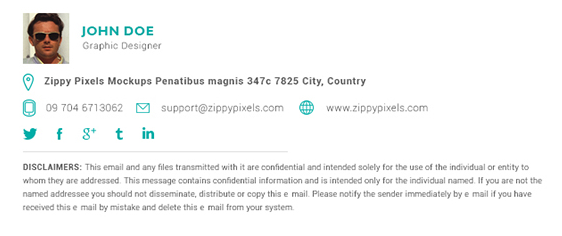
This original preview did not have a working download link attached. Use the original editable packages above for a direct file download.
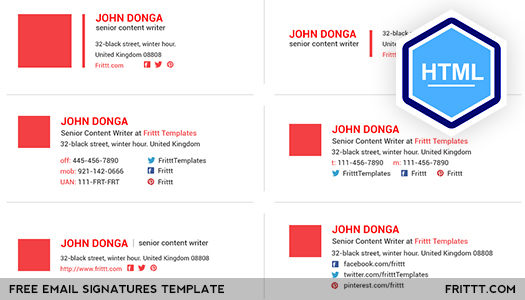
This preview’s original source could not be verified during the link check. The original editable packages above provide direct downloads.

View original source 3 (external page). Check the source for the actual format and current access conditions.
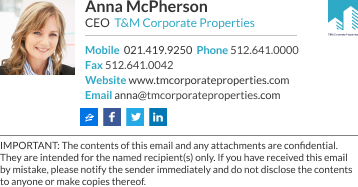
View original source 4 (external page). Check the source for the actual format and current access conditions.

View original source 5 (external page). Check the source for the actual format and current access conditions.
Frequently asked questions
What is inside each email signature ZIP?
A standalone HTML file, the signature HTML snippet, a plain-text fallback and editing instructions. The two designs are Compact Professional and Studio Contact.
Are the preview images the files to paste into email?
No. They illustrate the design. Customize and use the HTML or plain-text content so names and contact details remain useful text where supported.
Will these work identically in every email client?
No universal compatibility is promised. Editors and clients can change formatting. Test a real received message and use the plain-text fallback if necessary.
Why do the sample links not work?
They use deliberate placeholders, including example.invalid. Replace both visible text and href destinations with your verified email, phone and website details.
Do I need to paste raw HTML into Gmail or Outlook?
Use the installation method supported by your application. A rich-text signature editor may accept the rendered block rather than source code. Follow the official guide for your version and test the result.
You must be logged in to post a comment.