
These product comparison templates help you evaluate alternatives using the same requirements and cost assumptions. Download a feature comparison worksheet and a separate ownership-cost worksheet in editable Excel format. Both contain example entries, blank rows and a preview so you can choose the layout that matches your buying decision.
A useful comparison begins with what the product must do for you. Price matters, but capacity, compatibility, service arrangements and operating costs can change which option makes sense. The worksheets help you document those factors without assuming that the cheapest purchase price or the longest feature list automatically identifies the best choice.
Use the feature worksheet to record requirements and evidence. Use the cost worksheet to compare a common ownership period in one currency. Replace every example figure with verified information for the products you are considering. These files do not retrieve live specifications, calculate an automatic winner or make purchasing recommendations.
Download the two worksheets | Read the completion guide | Frequently asked questions
Download the two editable templates
Each button downloads an original XLSX workbook directly. Open it in compatible spreadsheet software, save a fresh copy and replace the example entries. The preview shows the supplied layout; sample people, dates and amounts are illustrations. Check formulas after extending calculation ranges.
Product Feature Comparison
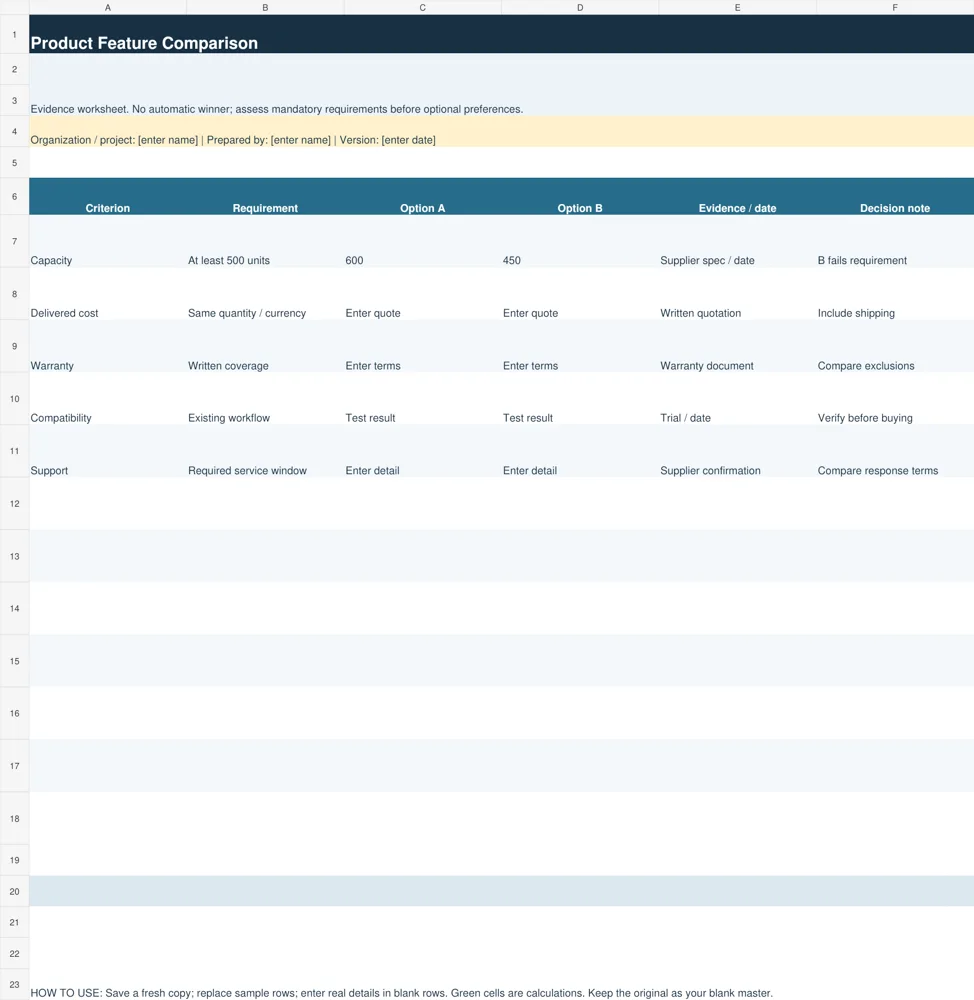
Use the feature sheet to compare requirements and evidence for two options. Mandatory requirements are assessed before optional preferences.
Download Product Feature Comparison (XLSX)
Product Ownership Cost Comparison
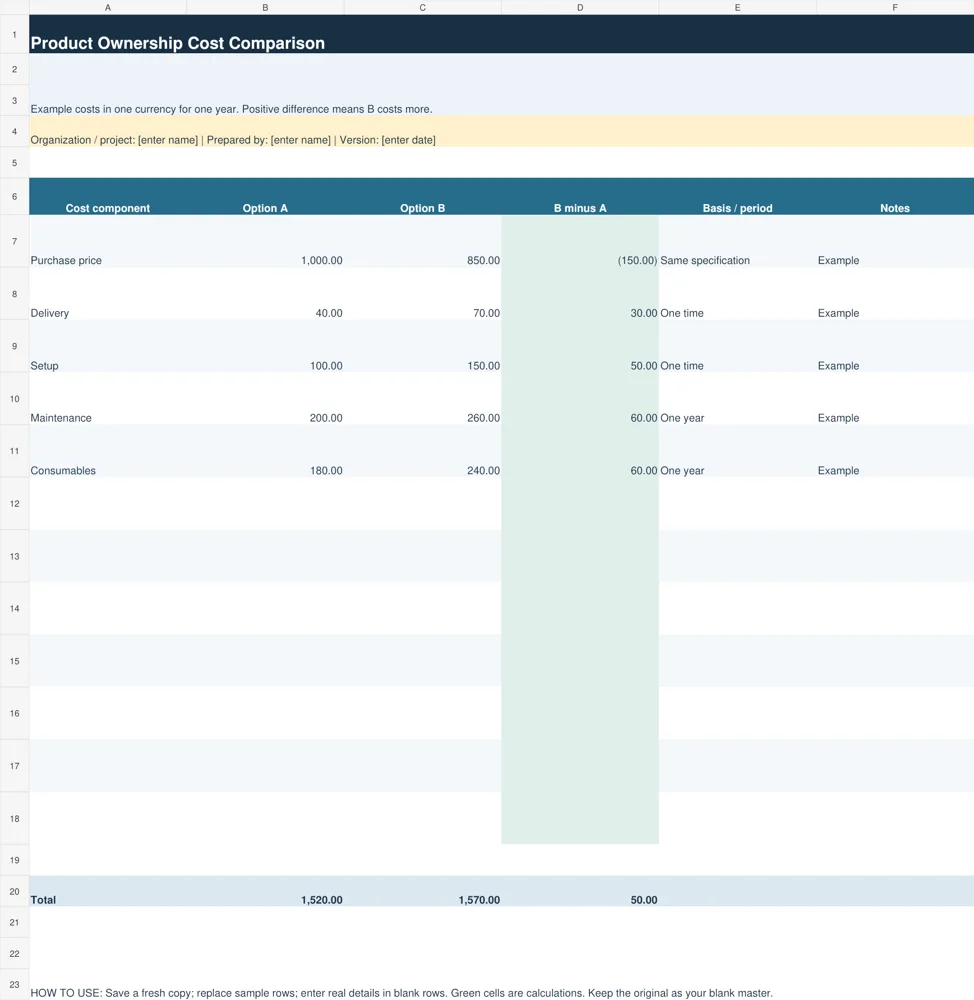
Use the cost sheet to compare purchase and ownership components on the same period and currency basis. It calculates totals and Option B minus Option A.
Download Product Ownership Cost Comparison (XLSX)
Choose a feature chart or an ownership-cost comparison
The Product Feature Comparison sheet records a criterion, requirement, two options, evidence or date and a decision note. It is useful when the products differ in capability. For example, if the minimum required capacity is 500 units, a 450-unit option does not meet that requirement even if it is less expensive.
The Product Ownership Cost Comparison sheet records cost components for Option A and Option B, the difference between them, the basis or period and notes. It includes sample purchase, delivery, setup, maintenance and consumable costs. The difference is Option B minus Option A, so a positive result indicates that B costs more for that component.
Use both worksheets for an important purchase. The feature chart helps establish whether an option is suitable, while the cost chart shows its financial implications within the chosen period. Keep the conclusions linked to your actual requirements. A product that fails a mandatory condition should not become acceptable merely because unrelated preferences look attractive.
Set requirements before comparing products
Write down the task the product must perform and the conditions in which it will be used. For a business device, this might include required capacity, compatibility with existing systems and service availability. For a personal purchase, size, comfort or ease of use may matter. Define these criteria before reading promotional comparison charts.
Separate mandatory requirements from preferences. A mandatory requirement is a condition the product must meet to be considered. A preference can influence the choice among suitable options. This distinction keeps an attractive optional feature from concealing a critical limitation. Add a clear note where a requirement has not yet been verified.
Use measurable language when possible. Instead of reliable support, record the required service hours, location or response arrangement. Instead of adequate capacity, enter the minimum capacity and the units used to measure it. Precise requirements make it easier to ask suppliers the same questions and compare their answers fairly.
Limit the table to criteria that affect your decision. A long chart filled with minor differences can distract from a few important conditions. If a feature has no practical use for your situation, do not give it the same attention as compatibility, maintenance or delivery timing. The worksheet should clarify the choice rather than collect every specification.
Document the selected products and agreed quantities with our purchase order formats.
Collect comparable evidence
Record where each claim came from and when it was checked. Evidence may include a manufacturer specification, a written quotation, a warranty document or a trial result. Keep source notes close to the criterion so you can distinguish documented facts from a salesperson’s informal statement. An unknown value should remain unknown until verified.
Compare equivalent versions and configurations. Two quotations can use the same product name while including different accessories, capacity or service terms. Record the configuration and any options needed to meet your requirements. If a required accessory is excluded from the advertised price, include it in the cost comparison.
For hands-on qualities, use a consistent trial where possible. Ask each option to perform the same task under similar conditions and record the result. A general review from another user can provide context, but it may not reflect your environment. Avoid turning subjective impressions into precise numerical facts without explaining the basis.
Recheck important information before committing to a purchase. Availability, quotations and service arrangements can change. The evidence-date column makes it easier to notice an old figure. Save copies of the relevant quotations and terms rather than assuming the web page will remain unchanged throughout your approval process.
Compare ownership costs on one basis
Choose a common time horizon and currency. The sample cost worksheet uses one year, but you can replace the period with the one relevant to your purchase. Include the initial price, delivery and setup, then the operating or service costs expected during that period. Do not compare one year of maintenance for one option with several years for the other.
Use the same quantity and level of use for both options. Consumable costs depend on how often the product is used, and a quoted unit price may apply only to a particular order size. Record those assumptions in the basis column. Where a cost is uncertain, label it as an estimate and identify what could change it.
Keep recoverable deposits, financing arrangements and resale assumptions separate unless the comparison explicitly includes them. Adding a deposit as a permanent expense or treating a possible resale value as guaranteed can distort the result. The provided worksheet is a simple undiscounted cost comparison, not a financing model or investment appraisal.
Check totals after adding rows beyond the prepared range. The formulas total the entered components and calculate differences; they cannot detect a forgotten cost or an inconsistent quotation. Review the list of included costs with the person who will use or maintain the product. That review often reveals expenses missing from the initial price.
Record supplier information consistently using vendor registration forms.
Worked example: purchase price versus total cost
Option A has an example purchase price of 1,000, delivery of 40, setup of 100, one-year maintenance of 200 and consumables of 180. Its total is 1,520. Option B costs 850 to buy, with delivery of 70, setup of 150, maintenance of 260 and consumables of 240, giving a total of 1,570.
Although B is 150 cheaper at purchase, the other included costs make its total 50 higher over the example year. The comparison does not prove that A is the better product. It demonstrates why an equal-basis cost table can reveal a result that the initial price alone conceals. Suitability and evidence still need review.
If both products meet the mandatory requirements, discuss whether the cost difference is material for your situation and whether other relevant factors change the decision. If a major operating cost is unknown, obtain better evidence before treating the total as final. Sensitivity can be explored by changing the relevant input and observing how the difference changes.
Common comparison mistakes and final review
Avoid copying a seller’s comparison chart without checking its criteria. It may highlight the seller’s strengths and omit limitations that matter to you. Also avoid mixing yes-or-no features with vague descriptions such as premium quality. Write down the evidence and explain why each selected criterion affects the purchase.
Do not average away mandatory failures. A high score for appearance cannot compensate for an incompatible connection if compatibility is required. The supplied feature sheet deliberately has no automatic ranking. You can document the decision in the note column and explain which requirements were met, which tradeoffs were accepted and what remains uncertain.
Before ordering, review the selected configuration, delivered price, service terms, lead time and approval requirements. Keep the completed comparison with the quotation and purchasing record. This makes the decision easier to explain later and gives future buyers a useful starting point without assuming that the same choice will remain best forever.
For a vehicle comparison, organize condition and valuation details with car appraisal forms.
Additional original previews and source references
The existing previews below are retained as reference examples. Source links open third-party pages or PDF references and may have their own access or licensing conditions. They are separate from the two original editable downloads above. An unavailable source is identified instead of being presented as a working download.
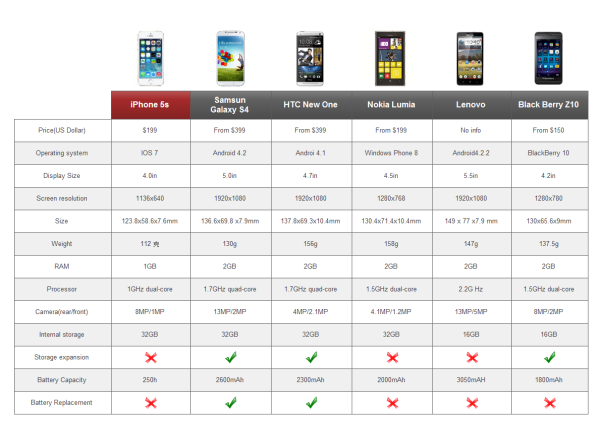
View original source 1 (external page). This is a source reference; inspect its format and access conditions there.
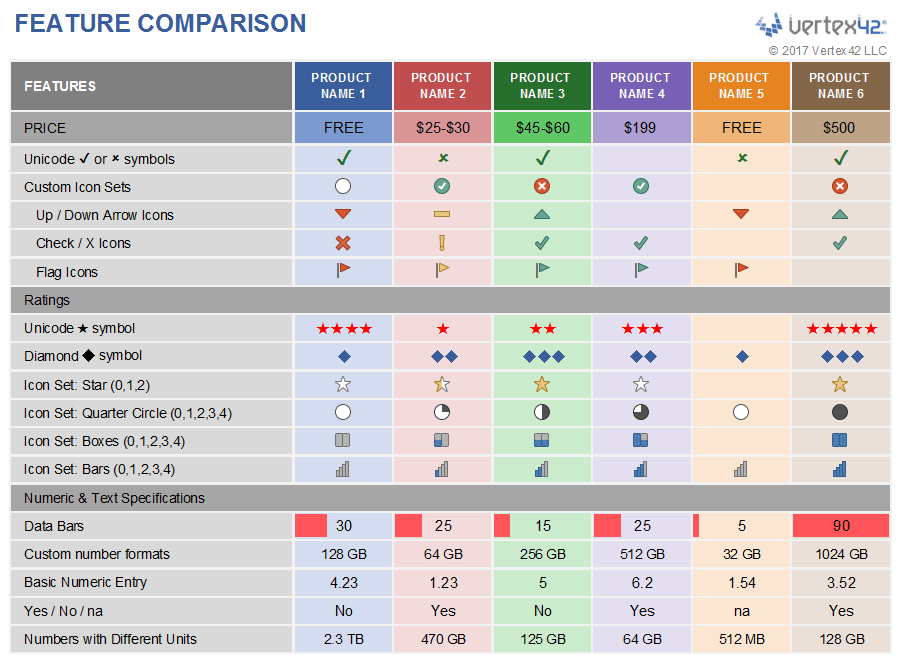
View original source 2 (external page). This is a source reference; inspect its format and access conditions there.
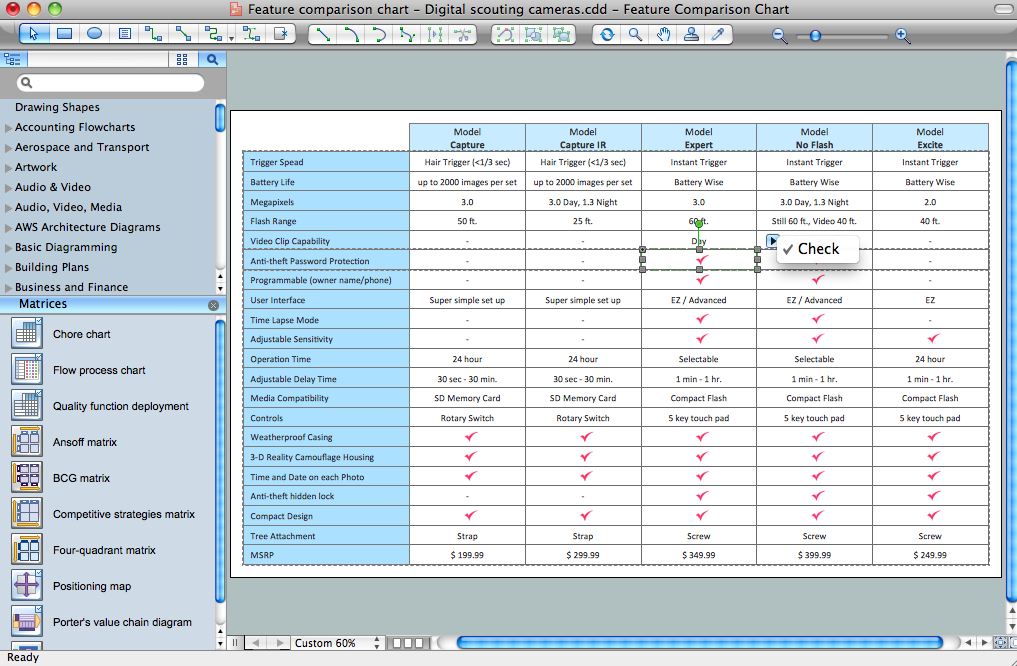
View original source 3 (external page). This is a source reference; inspect its format and access conditions there.
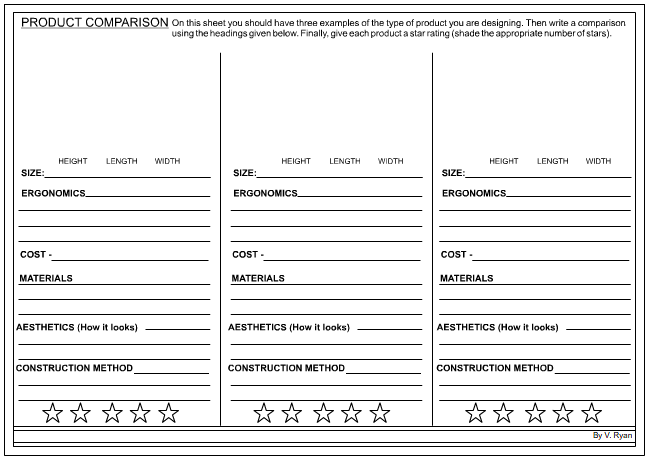
The original source for this preview could not be verified during the link check (the old address returned 404). Use the original editable downloads above for a direct file download.
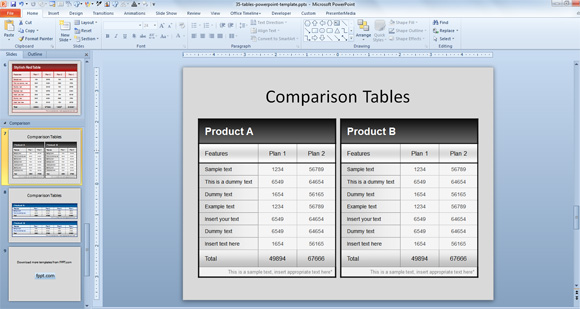
View original source 5 (external page). This is a source reference; inspect its format and access conditions there.
Frequently asked questions
What files are included in these product comparison downloads?
There are two original XLSX files: a feature comparison worksheet and an ownership-cost comparison worksheet. Each contains examples to replace and blank rows for your own criteria or costs.
Does the template choose the best product automatically?
No. The feature sheet records requirements and evidence. The cost sheet calculates entered totals and differences. You must assess suitability, missing information and the tradeoffs relevant to your own purchase.
Why compare ownership cost rather than price alone?
Delivery, setup, maintenance and consumables can change the cost of using a product. Compare the same period, quantity and currency so the totals describe a consistent basis.
Can I add more than two products?
Yes, by adapting the columns. Review formulas and labels after changing the cost sheet, and maintain a consistent evidence record for every option.
What does a positive cost difference mean?
The difference is Option B minus Option A. A positive value means B costs more for the row or total shown; a negative value means B costs less within the included assumptions.
You must be logged in to post a comment.