
Download 24 free Excel expense report templates for tracking spending at home, submitting a reimbursement at work, or managing costs for a business or project. Each spreadsheet has sample entries to show where the figures go and formulas for the totals it needs. Open any preview to see the actual worksheet before downloading its editable .xlsx file.
Start with one of these reports
- Monthly household expense report
- Employee reimbursement form
- Business travel expense report
- Mileage reimbursement log
- Small business expense report
Monthly Household and Personal Expense Reports
Monthly Household Expense Report
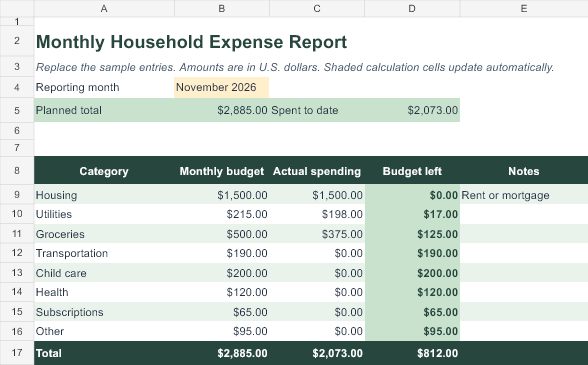
Compare planned and actual spending across rent or mortgage, groceries, utilities and other monthly household expenses. Enter a target in each category and use the remaining column to see where next month’s budget needs adjusting.
Weekly Spending Tracker
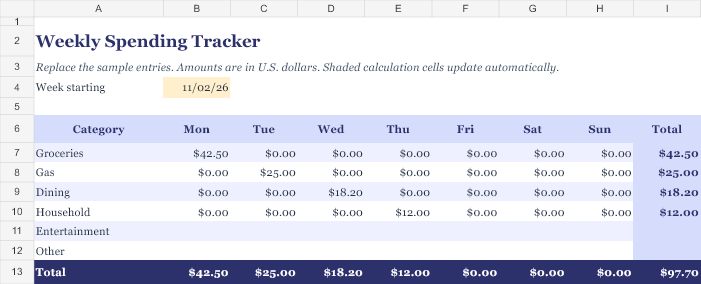
Record spending by weekday and category. Use the daily totals to spot expensive days and the category totals to see where the week’s spending went.
Monthly Bills and Subscriptions Tracker
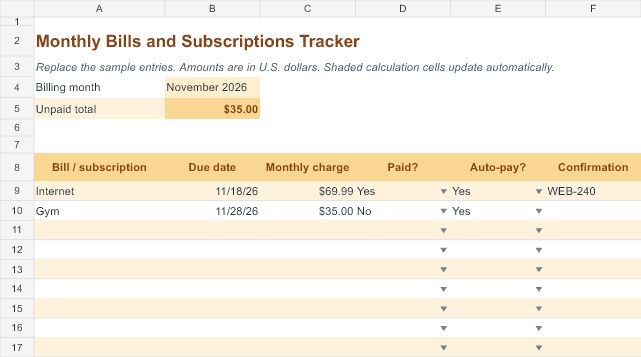
Use one line for each bill or subscription and mark it paid only after the charge posts. The unpaid total shows how much is still due this month.
Roommate Shared Expense Report
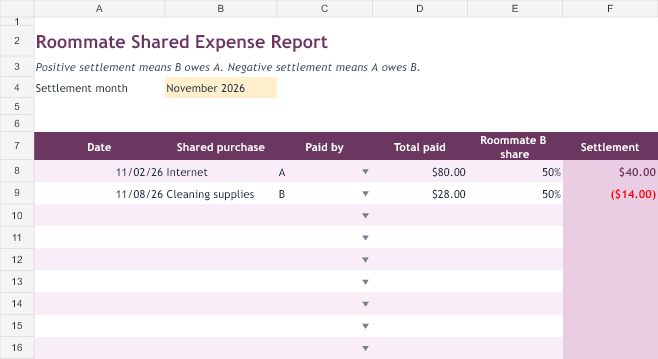
Enter what each roommate paid and adjust the split for each bill. The settlement shows who owes whom after combining charges in both directions.
Childcare Expense Tracker
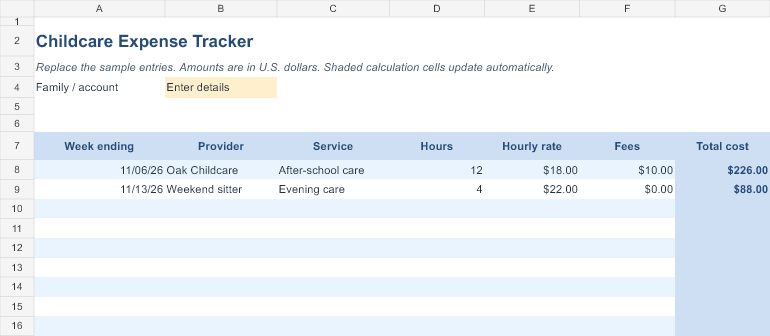
Use a row per sitter or service week. Enter care hours, the rate and any flat fees separately, then compare the weekly totals to the provider’s invoices.
Medical Out-of-Pocket Expense Report
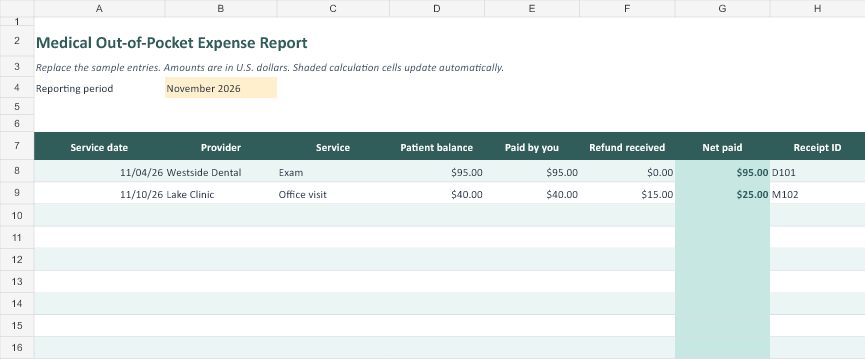
Enter the patient balance from the provider, the amount paid and any refund received. Use receipt references to reconcile payments without recording diagnoses or policy numbers.
Employee, Travel and Office Expense Reports
Employee Expense Reimbursement Form
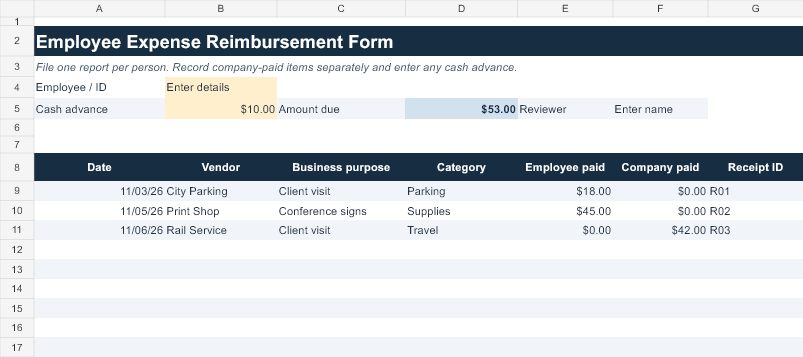
Submit one line per receipt. Separate employee-paid items from company-paid charges, then subtract any cash advance to calculate the amount owed.
Business Travel Expense Report
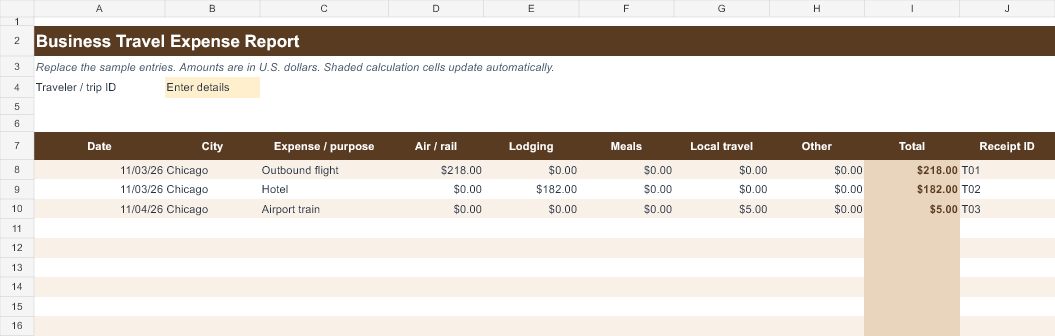
Use one line per receipt and put the amount in its category. Check the trip’s category subtotals and attach receipts with matching reference numbers.
Business Mileage Reimbursement Log
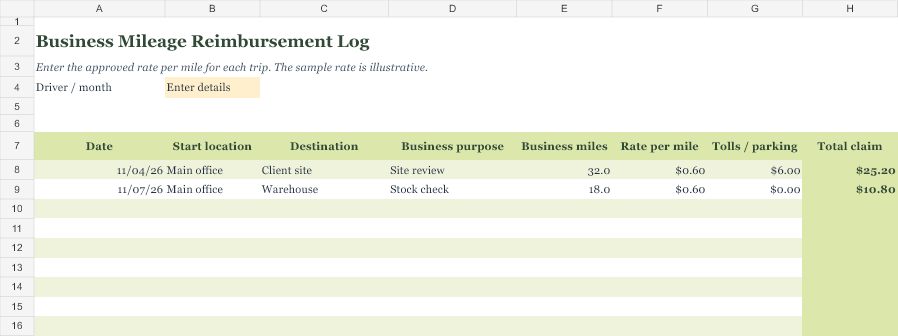
Record business miles for each trip. Enter your employer’s approved rate and only the extra tolls or parking the policy allows.
Corporate Credit Card Expense Report
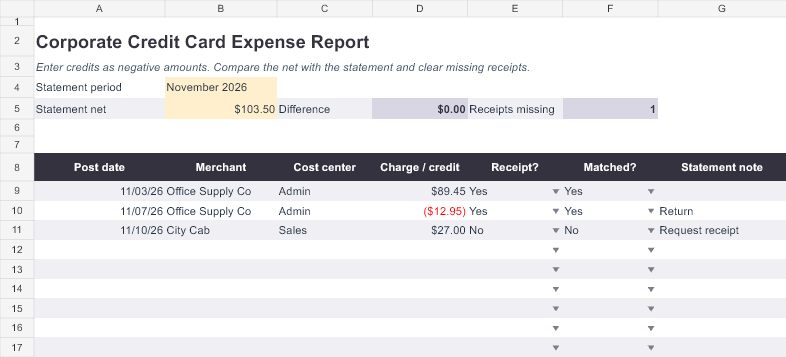
Enter statement charges as positive and credits as negative. Compare the net total to the statement, then use the receipt and match fields to clear exceptions.
Petty Cash Expense Report
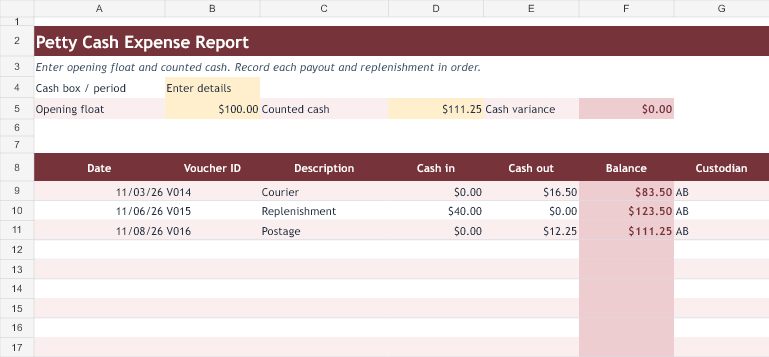
Enter the opening float, then record replenishments and payouts in order. Compare the ending book balance with the cash counted in the box.
Office Supplies Expense Report
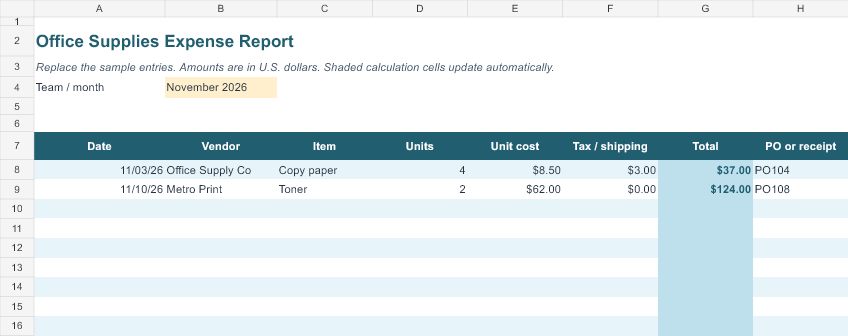
Enter item quantities and unit prices on each line. Assign order-wide tax or shipping to one line or allocate it across lines so the charge is counted once.
Department Budget vs. Actual Report
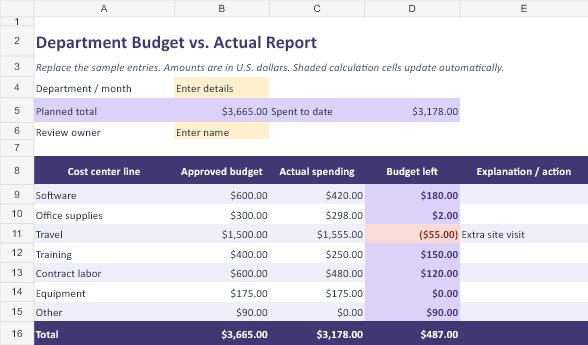
Use one line per cost category to review monthly office spending. Add the reason for significant overruns and record the corrective action before the next review.
Small Business and Property Expense Reports
Small Business Monthly Expense Report
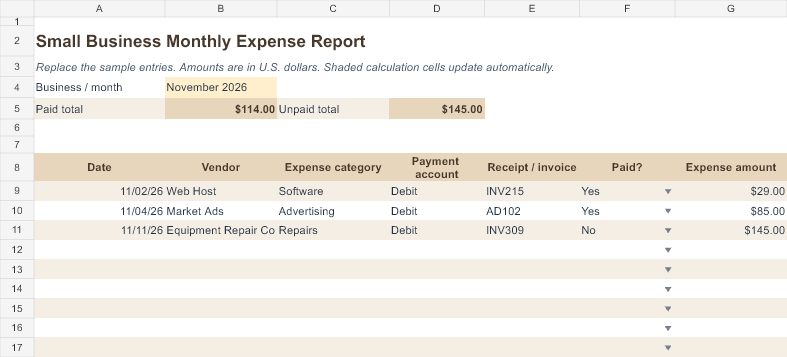
Record recurring costs, supplies, advertising and other operating expenses. The paid and unpaid totals help reconcile what’s cleared and what still needs attention.
Freelancer and Contractor Expense Report
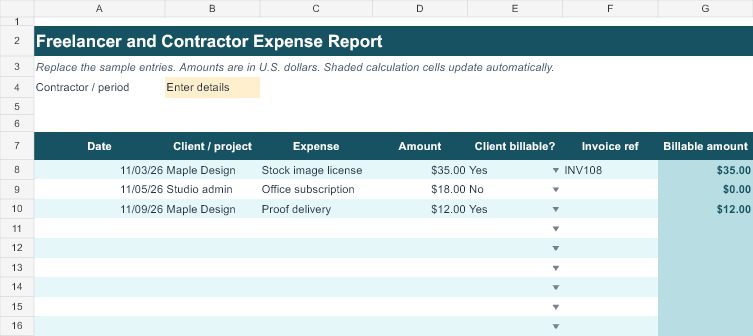
Capture project expenses as you incur them. Mark billable charges using the client agreement, then add the invoice number when you pass a charge through.
Construction Job Cost Expense Report
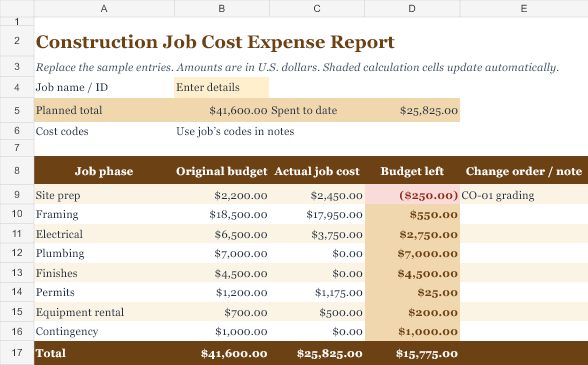
Enter the original budget and actual costs by phase. Keep change-order reasons in the notes and discuss the largest variances with the project lead.
Rental Property Expense Report
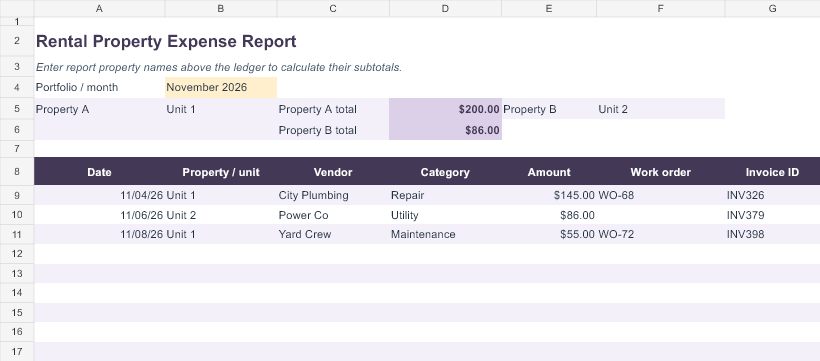
Label each payment with the property or unit. The property subtotals make it easier to compare operating costs and trace repairs to a work order.
Vehicle Maintenance Expense Report
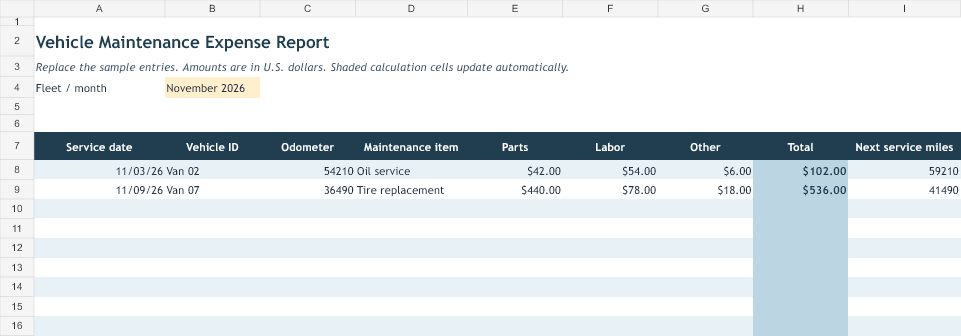
Use one line for each service visit. Split parts and labor, then enter the next service mileage so the fleet manager can pair costs with maintenance planning.
Project, Event and Community Expense Reports
Event Budget and Expense Report
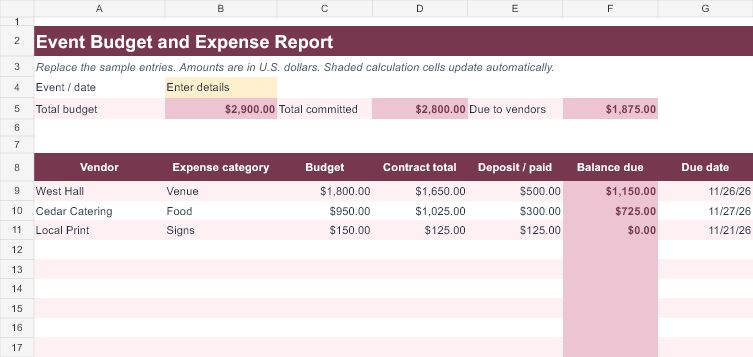
Enter the agreed vendor total and all payments to date. Use the balance-due column with vendor due dates, and compare total commitments to the event budget.
Nonprofit Grant Expense Report
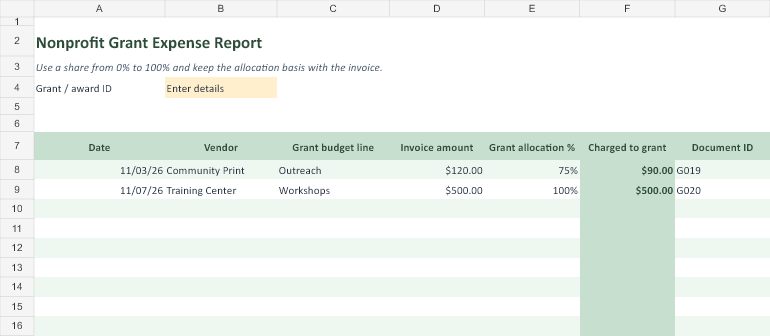
Record each invoice and enter the share allocated to the grant. Keep the allocation basis with the invoice and match the budget-line labels to the funder’s reporting categories.
Home Renovation Expense Report
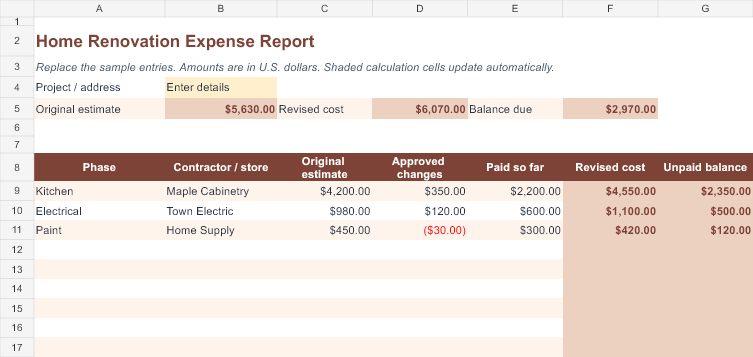
Track each contractor or supplier separately. Record approved changes and compare payments against the revised cost before releasing the final installment.
Moving Expense Report
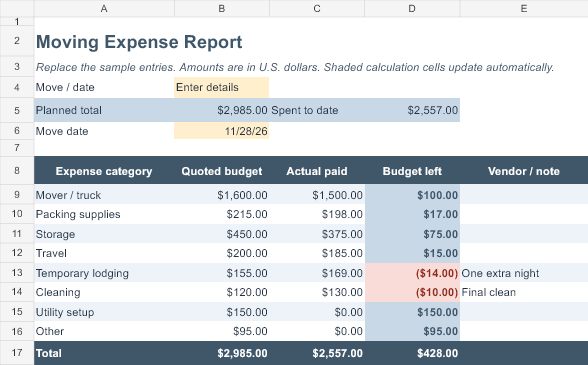
Keep a running comparison between quotes and actual moving costs. Use the notes to distinguish refundable deposits from final spending and save move-related receipts together.
School Club Expense Reimbursement Form
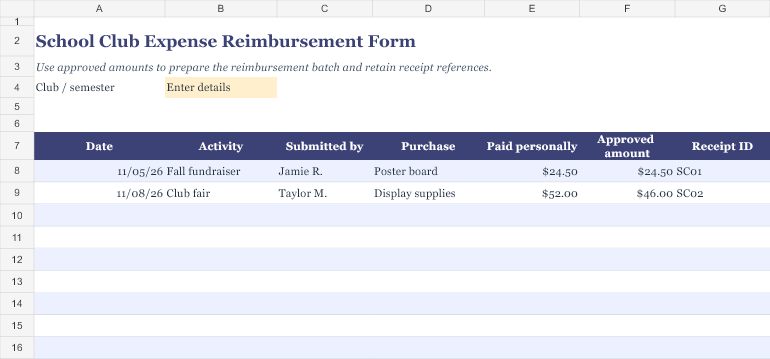
Give the treasurer a list of purchases by club activity. Record the amount approved beside what was paid, then use the total approved amount for reimbursement.
Vacation Expense Report
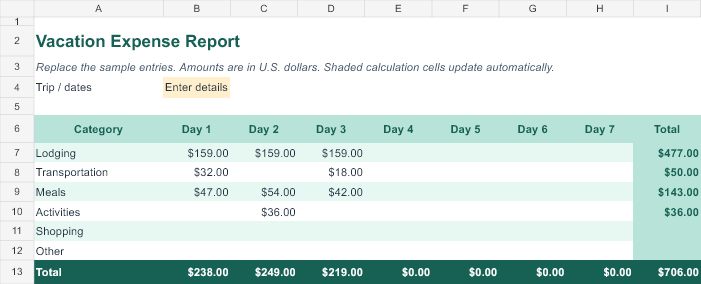
Use each column for a trip day. Log settled amounts by category and compare daily totals while the trip is in progress.
How to fill out an expense report
Start by deciding what the report needs to answer. For a household, that may be how much you spent against your monthly budget. At work, it may be what an employee should be reimbursed. For a project, it may be how much you still owe vendors. Choose the layout with the fields that answer that question.
- Set the reporting period. Use one calendar month, a single trip, the dates on a credit card statement, or a specific project phase. Follow the same date convention each time so you can compare reports later.
- Enter one line per purchase where the template has a ledger. Record the merchant, amount, purpose and receipt number. For a category summary, add transactions by category first and carry the subtotals into the report.
- Record payments and credits consistently. The corporate card workbook expects a refund as a negative charge. The medical workbook has a separate refund column and expects a positive refund amount there. Use the convention shown by the example row in your file.
- Check the total against your source records. Compare the sheet with your statement, cash count or receipt batch. Resolve differences while you can still trace when and where the charge occurred.
- Save a clean copy for reuse. Rename the completed workbook for the month, employee or project. Clear the sample input values from a fresh copy and leave the formula cells in place.
How to prepare a monthly expense report for your home
Gather your checking and card statements, cash receipts and recurring bills. Use the household worksheet to enter budget and actual totals for housing, groceries, utilities, transportation, child care and other expenses. Review purchases that are easy to overlook, such as prescription copays, subscriptions and annual bills that fell due during the month.
Count card purchases when you categorize spending. Treat the payment from checking to the card account as a transfer to avoid counting the same purchases twice. If groceries were budgeted at $500 and you spent $575, the budget-left column shows a $75 overage. Before changing next month’s target, check whether this month included a bulk purchase or reflects an ongoing increase.
Use the weekly spending tracker when you want to see patterns by day. Use the monthly bills tracker when the main question is what still needs to be paid. If you use both worksheets, carry only actual, categorized spending into the monthly recap.
How to calculate an employee expense reimbursement
Open the reimbursement workbook and enter amounts paid out of pocket in the employee-paid column. Put purchases charged to a company card in the company-paid column so the reviewer can see the full cost. The amount due uses the employee-paid total and deducts the cash advance.
For example, $63 in eligible employee-paid receipts and a $10 advance leave $53 due to the employee. A separate $42 company-paid charge stays on the report and leaves the reimbursement unchanged. Review any negative amount due with your finance team before settling the advance. For travel or mileage, use your employer’s instructions for the trip and the rate approved for the period.
Give attachments the same references used in the report. If one receipt covers several expenses, give the split entries a shared reference and confirm the amounts add up to the receipt total. Use the approval field to record who reviewed the claim and when.
Budget, actual cost and unpaid balance
The budget is your spending target. The actual cost is what you’ve recorded so far. A vendor’s unpaid balance is the amount still due after payments. In the event worksheet, you may have a $1,800 venue budget, a $1,650 signed agreement and a $500 deposit. That leaves $150 of the venue budget available and $1,150 due to the vendor. The event workbook tracks the budget, agreement and payment as separate fields.
Use the same approach for a home renovation. Record each approved change beside the original estimate so the revised cost can be traced back to the quote. Enter the running paid amount for each contractor. Check the unpaid balance before making the next payment.
Frequently asked questions
Which expense report template is best for a small business?
Start with the small business monthly expense report for vendor costs, operating categories and paid status. Use the corporate card report to reconcile a card statement and the employee reimbursement form to calculate what the business owes an employee. A freelancer who passes costs through to clients can use the billable-expense worksheet.
Can I use the templates for recurring reports?
Yes. Make a copy for each reporting period. The transaction sheets have prepared entry rows. If you need more, insert rows above the total, copy any calculated cells into the new rows and confirm the total and summary formulas include them. On compact category or day summaries, replace the sample category amounts for the new period.
What should I do if a receipt is missing?
Record the expense and mark the receipt as missing where the workbook has a receipt-status field. Check whether you can obtain a replacement receipt from the vendor. For a work claim, ask the reviewer what documentation they accept and record the decision with the entry.
How do I print or share a completed expense report?
Open Excel’s Print Preview, use U.S. Letter if that is your paper size, and switch wide reports to landscape. If a report needs multiple pages, fit it to one page wide while leaving the height automatic so the rows stay readable. Share the editable file with anyone who needs to continue working on it, or export a PDF when the reviewer only needs the finished report.
If you need to track the tasks that happen before or after a purchase, see the editable checklist templates for moving, household shopping, and event planning.
You must be logged in to post a comment.